.avif)
TL;DR
A connected CPQ and CRM ecosystem brings quoting, pricing, and customer data into one seamless workflow, improving sales speed and revenue visibility.
- Align CRM opportunity data with CPQ pricing and configuration to accelerate deal execution
- Reduce manual entry and quoting errors with real-time, two-way data flow
- Strengthen forecasting with unified pipeline and proposal insights
- Enable scalable revenue operations through automated workflows and governance
There's a moment most sales reps know well. You've just finished a solid discovery call, the prospect is warm, and they want a quote by the end of the day. This is exactly the kind of friction that CPQ integration with your CRM, ERP, and billing systems is built to eliminate - starting with the connection between CPQ and your CRM.
It sounds like a small thing. But multiply that across every rep, every deal, every quarter, and the inefficiency adds up fast. More importantly, the errors add up too.
A rep pulls the wrong pricing tier. A discount was applied that wasn't approved. The quote goes out with last month's product list. The customer notices something is off, trust takes a small hit, and the deal stalls at exactly the wrong moment.
This is the hidden cost of disconnected revenue systems. Most sales teams have a CRM that manages relationships and sales pipeline visibility, and CPQ solutions that handle product configuration, pricing, and quote generation.
Both are doing their jobs. But when they don't share data, your team ends up filling the gap manually, which means more admin work, more room for error, and slower response times in a market where buyers aren't waiting around.
CPQ CRM integration closes that gap and helps streamline the sales process. When the two systems are connected, customer data flows directly into your quoting workflow.
Pricing rules apply automatically. Quotes generate faster, go out cleaner, and sync back into the CRM without anyone having to copy-paste across tabs. The result is a sales process that actually feels as efficient as it looks on paper.
This guide covers how CPQ CRM integration works, the business case for investing in it, and how to approach implementation in a way that holds up over time.
Understanding CPQ CRM Integration
CPQ CRM integration connects two systems that sit at the center of your sales process.
On one side, your CRM manages everything about the customer relationship: account history, contact details, deal stages, and pipeline activity. On the other hand, your CPQ software handles product configuration, pricing logic, and quote generation. If you're still weighing how the two tools divide the work, our overview of CRM and CPQ covers where each one fits before you get into integration.
Integration means these systems share data in real time rather than operating as separate environments that your team has to manually bridge.
At its core, CPQ CRM integration creates a unified workflow where customer and deal information from your CRM automatically populates your quoting tool, and completed quotes sync back into the CRM as part of the deal record. Nothing lives in isolation. Nothing needs to be entered twice.
CPQ and CRM: How They Support the Sales Process Together
CRM and CPQ tools are built for different jobs, but they support the same outcome: closing deals.
A CRM like Salesforce or HubSpot tracks the customer side of the equation. It stores account data, logs interactions, manages pipeline stages, and gives sales managers visibility into what's moving and what's stuck. It tells your team who the buyer is and where they are in the process.
CPQ handles the commercial side. It applies your product catalog, pricing rules, discount logic, and approval thresholds to generate an accurate, compliant quote. It answers the question of what you're selling and at what price.
When these systems are siloed, your team has to manually carry information between them. When they're integrated, that handoff happens automatically. The rep works within a single connected workflow, from opportunity to configured quote to signed proposal, without switching between systems or re-entering data at each step.
Why CPQ CRM Integration Matters
In many organizations, reps manually transfer opportunity details into quoting tools, then re-enter final pricing back into the CRM. This duplication wastes time and increases the risk of errors. Even small inconsistencies in pricing or account data can create compliance issues, customer frustration, and revenue leakage.
A connected system reduces manual entry, ensures pricing consistency, and improves visibility into quoting activity. More importantly, it strengthens collaboration across teams. Sales gains faster approvals and accurate proposals. RevOps gains cleaner data and stronger governance. Finance gains better forecasting and reporting accuracy.
Beyond efficiency, this alignment supports better customer experiences. Buyers receive accurate quotes with consistent pricing quickly. Deal cycles shorten. Trust increases.
These benefits become clearer when broken down across specific sales and revenue functions.
Key Business Benefits of CPQ CRM Integration
.avif)
Integration between CPQ and CRM is not just a technical upgrade. It changes how your sales team operates day to day and how your business performs at a revenue level.
The benefits show up across deal velocity, quote accuracy, rep productivity, and customer experience. Here is what actually changes when the two systems are connected:
1. Accelerating Sales Cycles
The time between a qualified opportunity and a signed deal is one of the most consequential metrics in B2B sales. Every unnecessary step in that window is a chance for the deal to cool, for a competitor to move faster, or for the buyer to deprioritize the decision entirely, highlighting common bottlenecks.
When CPQ and CRM are integrated, quote generation no longer requires reps to manually transfer customer data, look up pricing tiers, or chase approvals over email.
According to Salesforce's State of Sales report 2026, sales reps spend only 40% of their week actually selling, with the rest going to administrative tasks.
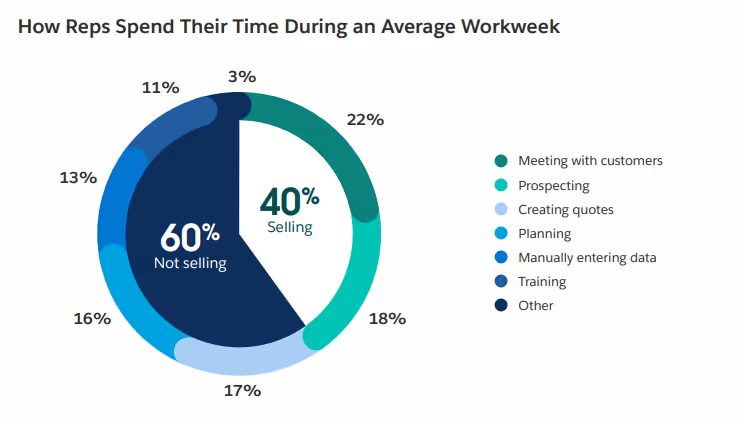
Integration reclaims that time by automating the handoffs that currently happen manually between systems.
2. Increasing Win Rates and Deal Size
Buyers form impressions quickly. A fast, accurate, well-structured quote signals that your team is organized and that working with your company will be straightforward. A slow or error-prone quote signals the opposite, often before the relationship has a chance to develop.
When CPQ pulls directly from CRM data, reps have the full context of the customer's history, segment, and deal requirements at the point of quoting, allowing them to accurately configure complex products.
That context makes it easier to configure relevant proposals, surface upsell and cross-selling opportunities already visible in the account record, and send quotes that reflect what the buyer actually needs and their specific customer needs rather than a generic package.
3. Reducing Quote Errors and Rework
Manual data entry is where quote errors begin. A rep copies the wrong account name, applies the wrong pricing tier, or works from a product template that has not been updated. These are not rep failures. They are predictable outcomes of asking people to manually bridge disconnected systems.
Integration eliminates the manual transfer of data between platforms. Pricing rules enforced in the CPQ tool apply automatically based on inputs that come directly from the CRM, and approval workflows are triggered based on deal parameters rather than rep memory. Fewer errors mean less rework, and less rework means deals move faster.
4. Improving Sales Team Productivity
Every time a rep switches between systems, re-enters data, or manually tracks down an approval, they are doing work that should be automated. At the individual level, this feels like minor friction, but across an entire sales team running dozens of active deals, it becomes a significant and measurable drag on output.
Connected systems reduce that friction structurally. Reps work within a single workflow that spans from opportunity to quote without requiring manual handoffs, managers get quoting visibility directly within the CRM, and RevOps teams can build automation around deal stages that would simply not be possible without shared data between systems.
5. Enhancing Customer Experience
The buyer's experience of your sales process is shaped by how quickly you respond, how accurate your proposals are, and how consistent your communication is across touchpoints. All three of these are harder to deliver when your internal systems are not aligned.
With CPQ CRM integration, customers get faster responses because quote generation is no longer a multi-step manual process. They get more accurate proposals because pricing and configuration are drawn from a connected source. And they get consistency across every interaction because every rep working the account views the same data.
6. Improving Revenue Forecasting
Forecasting accuracy depends on data quality, and data quality depends on how well your systems are connected. To see whether that connection is actually paying off, track it against the same CPQ metrics - like quote-to-close conversion rate and average deal size - that measure CPQ performance overall
When quotes live in a separate CPQ tool that does not sync with the CRM, your pipeline view is incomplete. Sales managers are forecasting based on opportunity stages without knowing whether a quote has been sent, revised, or accepted. Finance is working from numbers that may already be outdated.
Integration brings quoting activity into the CRM record in real time. Leadership can see not just where deals are in the pipeline but what has been quoted, at what price, and whether the customer has responded.
That visibility makes forecasts more reliable and gives revenue operations teams the data they need to identify where deals are stalling and why.
How CPQ CRM Integration Works
The business impact of a connected system becomes clearer when we look at how the integration functions behind the scenes. While the technical setup can vary, the core principle remains consistent: structured data flows between systems in a way that supports the entire sales lifecycle.
Instead of treating quoting and customer management as separate workflows, integration connects them into one continuous process, from opportunity creation to final deal closure.
Understanding the mechanics helps clarify why this integration delivers such tangible operational value.
Data Flow Architecture
At a high level, most implementations follow a structured data flow model:
- Customer, account, and opportunity data originate in the CRM
- That data flows into the CPQ system for configuration and pricing
- Finalized quotes, pricing details, and approval statuses sync back into the CRM
This ensures consistency across systems. The CRM remains the system of record for customer and pipeline information, while the CPQ engine governs pricing logic and configuration accuracy.
Clear data ownership is critical here. Organizations must define:
- Which system controls customer master data
- Where pricing rules are maintained
- How updates are validated before synchronization
Without defined ownership, duplicate records or sync conflicts can quickly undermine the integrity of the integration.
Bi-Directional Data Synchronization
Modern integrations typically rely on bi-directional synchronization. This means data flows both ways in near real-time.
For example:
- Updated customer details in CRM automatically reflect in the quoting workflow
- Revised pricing or quote totals update the opportunity record immediately
- Approval status changes sync across systems
This real-time alignment improves visibility and reduces discrepancies between systems. However, bi-directional sync requires strong governance to prevent duplicate records, latency delays, and conflicting updates.
Proper validation rules and structured field mapping are essential to maintain a single source of truth.
Workflow Automation in Integrated Systems
The real power of integration emerges when automation is layered into the connected workflow.
Integrated environments can enable:
- Automated approval routing based on discount thresholds
- Triggered notifications when quotes are updated
- Auto-generation of proposals from opportunity data
- Real-time updates to pipeline value once quotes are approved
Instead of exporting data between tools or waiting for manual approvals, the system handles repetitive steps automatically.
This reduces friction, accelerates execution, and ensures governance rules are applied consistently across every deal.
Understanding these mechanics sets the stage for the next important decision: choosing the right architecture and integration method for your organization’s needs.
CPQ CRM Integration Architecture and Methods
.avif)
How you connect your CPQ and CRM systems matters as much as the decision to connect them. The architecture you choose affects how flexible the integration is, how much technical effort it requires to maintain, and how well it scales as your business grows.
There is no single right answer, but there is a right approach for your specific situation.
1. Native or Built-In Integrations
Many CPQ and CRM vendors offer native integrations that are built directly into the product. If your CPQ tool is designed to work with Salesforce, for example, the integration may be available out of the box with minimal configuration required.
These integrations are typically the fastest to deploy and the easiest to maintain because the vendor handles the underlying connectivity and updates it alongside the product.
The tradeoff is flexibility. Native integrations are built to cover common use cases, which means they work well for standard workflows but can become limiting if your process has unusual requirements. Customization options are often restricted, and you are dependent on the vendor's release cycle for updates and fixes.
For companies with straightforward sales processes and a common tech stack, native integrations are usually the right starting point.
2. API-Based Integrations
Application Programming Interfaces, or APIs, allow systems to exchange data in a structured, configurable way. An API-based integration gives your technical team precise control over which data fields sync, in what direction, and under what conditions. This flexibility makes APIs the preferred approach for companies that need more than a standard integration can offer.
The complexity trade-off is real. Building and maintaining an API integration requires technical expertise, ongoing monitoring, and updates whenever either system changes its data model or API version. It is not a set-it-and-forget-it solution.
For companies with dedicated RevOps or engineering resources and non-standard workflows, the investment in an API-based approach pays off in long-term control and adaptability.
3. Middleware and Third-Party Connectors
Middleware platforms sit between your CPQ and CRM systems and act as an intermediary that manages the data exchange. Tools like MuleSoft, Boomi, or Zapier fall into this category. They allow you to build integration logic through a visual interface rather than custom code, which lowers the technical barrier significantly.
Middleware is particularly useful when you are connecting more than two systems. If your CPQ and CRM integration also needs to sync with your ERP, billing platform, or contract management tool, a middleware layer can manage all of those connections in one place rather than building separate point-to-point integrations for each.
The consideration to keep in mind is cost and vendor dependency. Middleware platforms add a layer to your tech stack, come with their own licensing fees, and create a dependency on a third-party vendor that sits between your core systems.
4. Custom Integration Development
For large enterprise environments with highly specific requirements, custom integration development gives you complete control over the connection between systems. Your engineering team builds the integration from the ground up, tailored precisely to your data model, workflows, and business rules.
The appeal of custom builds is that nothing is off the shelf, so nothing is a compromise. The risk is that custom integrations are expensive to build, time-consuming to test, and demanding to maintain.
Every time your CPQ or CRM vendor releases an update, your custom integration may need to be revisited. Companies that go this route often underestimate the long-term maintenance burden, particularly as team members who built the original integration move on.
Choosing the Right Integration Approach
The right architecture depends on four factors: the complexity of your sales process, your existing tech stack, your internal technical capabilities, and how much you expect your requirements to change over time.
If you are a mid-market company with a standard sales motion and a common CRM, start with a native or pre-built integration and validate whether it covers your needs before investing in something more complex.
If you have non-standard workflows, multiple systems that need to stay in sync, or a technical team capable of managing ongoing development, an API-based or middleware approach gives you more room to grow.
Custom development should be reserved for situations where the other approaches genuinely cannot meet your requirements, not as a first instinct. The goal is a connection that is reliable, maintainable, and scalable, not one that is technically impressive but operationally fragile.
Also read → The Complete Guide to CPQ Integration: Unlocking Sales Efficiency in 2026
Pre-Implementation Planning for CPQ CRM Integration
Many integration projects fail not because of technology, but because of insufficient planning. Before any APIs are configured or connectors activated, organizations must align on objectives, governance, and data readiness.
Strategic preparation ensures the integration supports revenue outcomes, not just system connectivity.
With planning complete, organizations can move into structured implementation.
1. Defining Integration Objectives
Every successful integration begins with clarity. What problem are you solving?
Objectives should go beyond “connect the systems” and instead reflect measurable business outcomes, such as:
- Reducing quote turnaround time
- Improving forecast accuracy
- Minimizing pricing errors
- Increasing sales productivity
Clear goals help align stakeholders across sales, RevOps, finance, and IT. They also provide a framework for evaluating post-launch performance.
Without defined success metrics, it becomes difficult to determine whether the integration is delivering real ROI.
2. Assessing System Compatibility
Before implementation begins, organizations must evaluate whether their existing systems can integrate smoothly.
This includes reviewing:
- Data models and field structures
- API availability and limits
- Infrastructure readiness
- Version compatibility
Compatibility risks often surface too late, during deployment or testing. Early technical assessment reduces rework and prevents costly delays.
A structured evaluation ensures both systems can exchange data reliably without structural conflicts.
3. Data Mapping and Field Configuration
Integration success depends heavily on accurate data mapping.
Each field in the CRM must correspond correctly to its equivalent in the CPQ system. Poor mapping can lead to:
- Incomplete customer records
- Pricing discrepancies
- Sync failures
- Duplicate entries
Field configuration should define:
- Which system owns each data element
- How updates are validated
- How conflicts are resolved
Strong data governance at this stage prevents long-term operational issues.
4. Security and Compliance Considerations
Data exchange increases risk exposure. Sensitive customer information, pricing structures, and contractual details move between systems.
Security planning should include:
- Access control policies
- Role-based permissions
- Encryption standards
- Audit logging and monitoring
Integration must also align with broader data protection policies and regulatory requirements.
When security and compliance are built into the architecture from the start, organizations reduce operational risk and maintain trust across teams and customers.
With strategic groundwork in place, the next step is executing the integration through a phased, structured implementation process.
Step-by-Step CPQ CRM Integration Implementation Process
Even with solid planning in place, implementation is where most integration projects run into trouble. Timelines get compressed, testing gets shortened, and change management gets skipped entirely. A phased approach - similar to the broader CPQ implementation roadmap most teams follow -helps you manage complexity, catch problems early, and bring your team along rather than dropping a new system on them without context
Phase 1: Discovery and Planning
Discovery is where you translate your business objectives into a concrete project scope. This phase should involve stakeholders from sales, RevOps, finance, and IT, not just the technical team managing the implementation.
Key activities in this phase:
- Document current quoting workflows and identify where manual handoffs occur
- Define the integration requirements based on your business objectives
- Agree on data ownership rules and establish which system is the source of truth for each data type
- Identify stakeholders, decision makers, and sign-off requirements for each stage
- Set a realistic timeline with a buffer for testing and iteration
The output of discovery should be a clear project scope that everyone has reviewed and agreed to. Scope changes mid-implementation are one of the leading causes of delays, so the more you can lock down upfront, the smoother the rest of the process will be.
Phase 2: Configuration and Setup
With discovery complete, the technical work begins. This phase covers the actual configuration of the integration, including API connections, data field mapping, workflow automation rules, and permission settings.
What this phase typically involves:
- Setting up the integration layer, whether native, API-based, or middleware
- Configuring data field mappings based on the documentation from discovery
- Building workflow automation rules, such as approval routing and stage progression triggers
- Setting user permissions and access controls across both systems
- Documenting every configuration decision for future reference
Resist the temptation to configure everything at once. Start with the core data flows, get those working correctly, and then layer in automation and edge case handling. Trying to build everything in a single pass makes troubleshooting significantly harder when something does not work as expected.
Phase 3: Data Migration and Testing
Before any user touches the integrated system, you need to validate that data is flowing correctly, completely, and without duplication. This phase is where many implementations cut corners, and where many post-launch problems originate.
A structured testing approach should include:
- Unit testing of individual data field mappings to confirm accuracy
- End-to-end workflow testing that simulates real quoting scenarios from opportunity creation to quote generation and sync-back
- Data integrity checks to verify that records are not being duplicated, overwritten, or lost in transit
- Edge case testing for scenarios like large deal sizes, non-standard discount approvals, and multi-currency quotes
- User acceptance testing with a small group of actual sales reps before full rollout
Do not treat testing as a formality. The data issues you catch here are far cheaper to fix than the ones you discover after your entire sales team is using the system.
Phase 4: User Training and Rollout
A well-configured integration that your sales team does not understand or trust will not deliver results. User adoption is not a given, and it does not happen by itself. This phase is where many technical implementations succeed on paper but fail in practice.
Effective rollout looks like:
- Role-specific training that focuses on what has changed in each person's day-to-day workflow, not a general system overview
- A pilot group of early adopters who can surface issues before full deployment and become internal champions for the new process
- Clear documentation that reps can reference after training, including how to handle common scenarios and where to go when something looks wrong
- A feedback channel so reps can report issues quickly during the transition period
- Manager training so frontline leaders understand the new workflow and can reinforce adoption in their teams
Phased rollout by team or region is almost always preferable to a big bang launch. It limits the blast radius if something goes wrong and allows you to refine the process before it reaches your entire organization.
Phase 5: Monitoring and Optimization
Integration is not a project with a finish line. Once the system is live, you need ongoing monitoring to ensure it is performing as expected and evolving alongside your business.
Build a monitoring and optimization plan that includes:
- Automated alerts for sync failures, data errors, or workflow breakdowns
- Regular audits of data quality across both systems to catch drift before it becomes a problem
- A defined process for handling edge cases and exceptions that fall outside your standard workflows
- Quarterly reviews of integration performance against the success metrics you defined in discovery
- A clear process for managing updates when either your CPQ or CRM vendor releases changes that affect the integration
The teams that get the most out of CPQ CRM integration treat it as a living system, continuously working to optimize it rather than viewing it as a one-time project. The initial implementation gets you connected. Ongoing optimization is what turns that connection into a sustained competitive advantage.
Technical Challenges in CPQ CRM Integration
Even well-architected integrations can encounter obstacles. While vendor materials often present connectivity as seamless, the reality is more nuanced. Integration touches core revenue workflows, meaning even small technical issues can have operational consequences.
Understanding common challenges helps organizations set realistic expectations and reduce risk through proactive planning.
1. Data Synchronization Issues
Data sync is the backbone of any connected system. When synchronization fails or behaves inconsistently, teams quickly lose trust in the integration.
Common issues include:
- Duplicate records across systems
- Conflicting updates between CRM and CPQ
- Latency delays affecting real-time visibility
- Field-level mismatches due to incorrect mapping
For example, if pricing updates in the quoting system do not sync immediately to the opportunity record, forecasts may reflect outdated values.
Strong governance, validation rules, and monitoring tools are essential to prevent these discrepancies from impacting sales operations.
2. System Compatibility Challenges
Not all systems are built on identical data models or infrastructure standards. Legacy platforms, custom objects, or heavily modified CRM environments can complicate integration.
Compatibility challenges may include:
- API limitations or throttling
- Structural differences in account hierarchies
- Custom fields without clear mapping equivalents
- Version mismatches between systems
Early technical assessment reduces the likelihood of discovering structural conflicts during late-stage testing or deployment.
3. Performance and Scalability Concerns
As organizations grow, so do transaction volumes, product catalog complexity, and quoting frequency.
If integration architecture is not designed for scale, it may result in:
- Slower sync times
- System timeouts during peak activity
- Delayed approval workflows
- Increased error rates
Scalability planning should account for future expansion, not just current workload. Integration must support evolving revenue operations without requiring a complete rebuild.
4. Security and Data Protection Risks
Connecting systems increases data exposure. Sensitive customer information, pricing structures, and contract details move between platforms.
Risks can include:
- Unauthorized access due to misconfigured permissions
- Incomplete audit trails
- Data leakage during transfer
- Weak encryption standards
Security controls must be embedded into the integration architecture from the outset. Access governance, monitoring, and compliance alignment are not optional add-ons; they are foundational safeguards.
While these challenges are real, they are manageable. A structured approach combined with operational discipline can significantly reduce complexity and improve long-term stability.
Best Practices for Successful CPQ CRM Integration
Getting the integration live is one milestone. Keeping it performing well over time is a different challenge. These practices are what separate integrations that deliver long-term ROI from those that gradually drift back into the same problems they were meant to solve.
1. Establishing Clear Data Governance
Data governance defines who owns which data, how it should be structured, and what happens when there is a conflict between systems. Without it, even a technically sound integration will start producing inconsistent records and sync errors that erode trust over time.
Define which system is the source of truth for each data type, establish naming conventions that apply across both platforms, and create a clear process for resolving discrepancies. Revisit these rules whenever a significant change is made to either system, because governance designed for your current setup may not hold up after an upgrade or catalog expansion.
2. Implementing Robust Error Handling
Sync failures and data errors are routine occurrences in any live integration, not exceptional events. The difference between a minor inconvenience and a serious disruption is how quickly the error is detected and how clearly the resolution path is defined.
Set up automated alerts for sync failures and workflow breakdowns so issues surface immediately rather than being discovered by a rep mid-quote. Maintain a log of errors over time, because recurring patterns usually point to a structural issue that needs to be fixed at the root rather than patched repeatedly.
3. Designing for Scalability
An integration built around your current data volumes and team size may start showing strain as the business grows. What works for twenty reps handling a hundred active deals may not hold up when those numbers double.
Avoid hard-coded values that would need manual updates as your catalog expands, and structure your data mapping in a way that accommodates new fields without requiring a full rebuild. Scalability is far cheaper to design in from the start than to retrofit into an integration later.
4. Maintaining Thorough Documentation
Documentation is almost always deprioritized when timelines are tight, and it is also the thing that causes the most pain twelve months later when someone needs to understand why a configuration decision was made.
Keep a record of every significant mapping rule and customization, including not just what was done but why. Good documentation reduces the risk that institutional knowledge walks out the door when a team member leaves, and makes future changes significantly faster to plan and execute.
5. Planning for Ongoing Maintenance
An integration that is not actively maintained will drift out of alignment with your business. Vendors release updates, pricing rules evolve, and sales processes change. Any of these can affect how the integration behaves if they are not accounted for.
Build a maintenance cadence into your operational plan from the start. Schedule regular reviews of integration performance against your original success metrics, and make sure there is always a clear owner responsible for the integration when something needs attention.
Conclusion
CPQ CRM integration is not a nice-to-have for modern B2B sales teams. It is the infrastructure that makes everything else work better. Faster quotes, cleaner data, more accurate forecasts, and a buying experience that reflects well on your team before the contract is even signed.
The companies that get the most out of integration are not necessarily the ones with the most sophisticated tech stack. They are the ones who invest time in planning, define clear objectives before touching any configuration, and treat the integration as an ongoing operational asset rather than a one-time project.
If your sales team is still copying data between systems, chasing approvals over email, or sending quotes that need revision because pricing was not current, the cost of inaction is already showing up in your pipeline. CPQ CRM integration addresses these problems in the quoting process at the source rather than managing the symptoms.
The path forward starts with an honest assessment of where your current process breaks down, which systems need to be connected, and what success looks like once they are.
Tools like Everstage CPQ are built to integrate directly with the CRM systems your team already uses, helping you move from disconnected workflows to a single connected revenue process.
Book a demo to see how Everstage CPQ can fit into your existing sales infrastructure.
Questions worth asking
The things most people want to know before they commit.
What is CPQ and CRM integration?
It refers to connecting a Configure, Price, Quote (CPQ) system with a Customer Relationship Management (CRM) platform so that customer data, opportunity details, pricing logic, and quote information flow seamlessly between both systems. This integration creates a unified quote-to-revenue workflow, eliminating manual data entry and improving visibility across the sales lifecycle.
Why should businesses integrate CPQ with CRM?
Businesses integrate these systems to reduce quoting errors, accelerate sales cycles, and improve forecasting accuracy. When pricing and configuration are directly aligned with real-time opportunity data, sales teams can respond faster and more accurately. Integration also strengthens collaboration between sales, RevOps, and finance by ensuring everyone operates from consistent, up-to-date information.
How long does integration typically take?
The timeline depends on system complexity, data readiness, and the chosen integration method. Native integrations can often be implemented within a few weeks, while API-based or custom builds may take several months. A structured planning phase significantly reduces delays during configuration and testing.
What systems are usually involved in this integration?
In most organisations, the CRM serves as the system of record for accounts and opportunities, while the CPQ system manages product configuration, pricing rules, and quote generation. In more advanced revenue ecosystems, additional systems such as ERP, billing, or subscription management platforms may also be connected to ensure full revenue lifecycle visibility.
Is integration complex for SaaS businesses?
For SaaS companies, integration is often essential due to recurring pricing models, subscription tiers, and dynamic discount structures. While SaaS environments typically support API connectivity, complexity increases when multiple pricing models, custom objects, or approval workflows are involved. Careful planning and governance reduce technical risk and ensure scalability.
Can integration improve forecasting accuracy?
Yes. When finalised quote values and approval statuses sync directly into the CRM, leadership gains real-time insight into deal value and pipeline progression. This reduces discrepancies between projected and actual revenue, leading to more reliable financial planning and performance reporting.