TL;DR
CPQ streamlines how businesses configure products, price deals accurately, and generate error-free quotes, helping sales teams move faster and close with confidence.
- Automates configuration and pricing to eliminate manual errors
- Speeds up quoting and accelerates deal cycles with guided workflows
- Improves accuracy, consistency, and margin control across complex deals
- Helps reps, managers, and finance stay aligned through a unified quoting process
Introduction
If you've ever watched a sales rep manually calculate pricing for a complex deal, you know how painful it can be. They're juggling discount approvals, checking product configurations, double-checking pricing rules, and hoping they didn't mess up the math. Meanwhile, the prospect is waiting. And waiting.
This is exactly why CPQ (Configure, Price, Quote) software exists.
CPQ tools automate the entire process of configuring products, calculating prices, and generating quotes. Instead of spending hours (or days) on a single quote, your sales team can generate accurate quotes in minutes. No more spreadsheet or human errors. No more pricing mistakes. No more deals lost because your quote took too long.
The global CPQ software market is projected to expand from US$3.2 billion in 2025 to US$8.9 billion by 2032, growing at a healthy 15.7% CAGR.
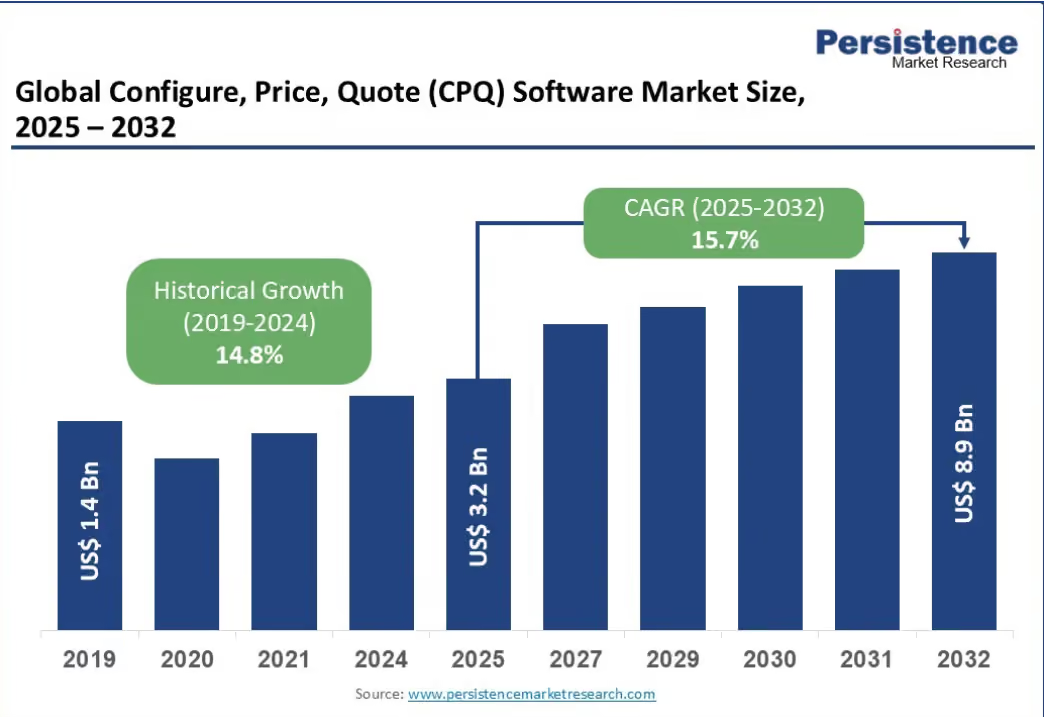
This reflects accelerating adoption across sectors and increasing recognition of CPQ as a must‑have revenue infrastructure.
So, in this guide, we're breaking down everything you need to know about CPQ. We'll explain what it is, how it works, why companies use it, and when you should consider implementing it for your business. Whether you're in SaaS, manufacturing, or any industry with complex pricing, this is your complete guide to understanding CPQ.
What Is CPQ? (Configure, Price, Quote)
.avif)
CPQ stands for Configure, Price, Quote, a sales tool that streamlines the process of configuring products, applying pricing rules, and generating accurate quotes for customers. It automates manual tasks, reduces pricing errors, and accelerates the quote-to-cash process, making it an essential tool for sales teams in complex sales environments.
Here's what each part means:
- Configure: Sales reps select and customize products based on what the customer needs. This includes choosing features, add-ons, bundles, and making sure everything is compatible. The CPQ system guides reps through valid configurations so they don't accidentally quote something your company can't actually deliver.
- Price: The system automatically calculates the price based on your predefined rules. This includes volume discounts, customer-specific pricing, promotional pricing, and any other pricing logic you've built in. No more manual calculations or hunting for the right discount approval.
- Quote: Once the configuration and pricing are locked in, the CPQ system generates a professional quote document. This includes all product details, pricing breakdowns, terms and conditions, and any necessary approvals. The quote is ready to send to the customer in minutes, not hours or days.
CPQ helps sales teams configure products correctly, ensures pricing accuracy, and delivers quotes quickly, ultimately improving sales efficiency and customer experience. It also integrates with other systems like CRM and ERP to provide a unified approach to deal management.
Why CPQ is Important for Business
Here's the reality: manual quoting is slow, error-prone, and doesn't scale.
When your sales team is building quotes manually, they're spending hours on administrative work instead of talking to customers. They're looking up pricing in spreadsheets, checking product compatibility, calculating discounts, and getting approvals routed through email. By the time the quote is ready, your competitor has already sent theirs.
CPQ solves this problem by automating the entire quoting process. Here's why that matters:
- Speed: CPQ reduces quote generation time from hours or days to minutes. Your reps can respond to customer requests immediately instead of making them wait. In competitive deals, speed matters. The first vendor to send an accurate quote often has the advantage.
- Accuracy: Manual quoting leads to mistakes. Reps miscalculate discounts, quote incompatible products, or use outdated pricing. CPQ eliminates these errors by enforcing your business rules automatically. The system won't let reps configure something that doesn't work or apply a discount that violates your guidelines.
- Consistency: With CPQ, every quote follows the same rules and format. You're not dealing with reps who have their own personal spreadsheets or quote templates. Everyone is working from the same system with the same pricing logic, which means consistent pricing across your entire sales organization.
- Scalability: As your product catalog grows and your pricing becomes more complex, manual quoting becomes impossible to manage. CPQ handles complexity without breaking. You can add new products, pricing tiers, and business rules without drowning your sales team in spreadsheets.
CPQ is especially critical for companies with complex pricing structures. According to Nucleus Research, organizations that implemented CPQ saw an average return on investment of 121%, recouping their initial spend in under 18 months.
These gains weren’t limited to the bottom line. CPQ users reported a 36% boost in overall revenue, along with a 42% reduction in operational costs, thanks to automated workflows, consistent pricing, and faster quote-to-cash cycles.
If you're in SaaS with usage-based pricing, manufacturing with thousands of SKUs, or telecom with bundled services, manual quoting simply doesn't work at scale. CPQ gives you the infrastructure to handle that complexity while keeping your sales team productive.
How CPQ Works: Configure → Price → Quote Explained Simply
CPQ breaks down the quoting process into three clear steps. Here's how each one works:
1. Configure
This is where the sales rep selects and customizes products based on what the customer needs.
Let's say you're selling software with different modules, user tiers, and add-ons. The Configure step guides your rep through the options. They select the base package, add the modules the customer wants, choose the right user tier, and pick any additional features.
The key here is that the CPQ system enforces compatibility rules. If certain features can't be combined, the system won't let the rep select them. If a customer needs Feature A, and Feature A requires Module B to work, the system automatically includes Module B or prompts the rep to add it. This prevents configuration errors before they happen.
2. Price
Once the product configuration is locked in, the CPQ system calculates the price automatically.
This is where your pricing rules come into play. The system applies volume discounts, customer-specific pricing, promotional rates, and any other pricing logic you've configured. If a customer qualifies for a 15% discount based on their contract tier, the system applies it. If they're buying enough volume to hit a discount threshold, that gets factored in too.
The CPQ system also handles discount approvals. If a rep wants to offer a discount that exceeds their approval limit, the system routes the request to a manager automatically. No more email chains or Slack messages asking for approval.
3. Quote
The final step is generating the actual quote document.
The CPQ system takes all the configuration and pricing data and creates a professional quote. This includes the product list, pricing breakdown, terms and conditions, and any custom language your legal team requires. The quote is formatted, branded, and ready to send to the customer.
CPQ systems like Everstage CPQ handle the entire workflow from quote to contract to order. Once the customer accepts the quote, it flows directly into your billing system without manual data entry.
The entire process that used to take hours now takes minutes. Your rep configures the product, the system calculates the price, and a professional quote is ready to go. That's CPQ in action.
What CPQ Software Does: Key Features & Capabilities
.avif)
CPQ software isn't just a quote generator. It's a complete system that handles product configuration, pricing automation, approvals, and integrations with your other business systems. Here are the core features that make CPQ valuable:
1. Product Configuration
CPQ systems include a product catalog with all your offerings, features, and options. Sales reps can search for products, build custom configurations, and bundle items together. The system enforces compatibility rules so reps can't quote configurations that don't actually work.
For complex products, CPQ tools offer guided selling. The system asks questions about what the customer needs and recommends the right configuration automatically. This is especially useful for new reps who don't know your entire product catalog yet.
2. Pricing Automation
This is where CPQ really shines. The system stores all your pricing rules in one place: list prices, volume discounts, customer tiers, promotional pricing, partner pricing, and geographic variations.
When a rep builds a quote, the pricing engine calculates everything automatically. No spreadsheets, no manual lookups, no math errors. The system applies the right pricing based on the customer, the product mix, and your current promotions.
3. Quote Generation
Once the configuration and pricing are finalized, CPQ generates the quote document. This includes all product details, line-item pricing, discount breakdowns, terms and conditions, and signatures if needed.
The quote is professionally formatted and uses your company's branding. Some CPQ systems let you customize templates for different deal types or customer segments.
Modern CPQ systems like Everstage CPQ now use AI to speed up the entire process. Instead of manually building quotes from scratch, reps can instantly generate first-cut quotes using AI that pulls context from your CRM, emails, and sales call transcripts. The AI analyzes the customer's requirements and creates an accurate quote in seconds, which reps can then review and customize.
4. Approval Workflows
When a rep needs to discount beyond their approval limit, the CPQ system routes the request automatically. The discount goes to the right manager based on the amount and deal type. Managers can approve or reject directly in the system.
This eliminates the endless email threads and speeds up deal cycles. Reps know exactly where their approval request stands, and managers have visibility into all discount requests across the team.
5. CRM and ERP Integration
CPQ doesn't exist in isolation. It integrates with your CRM (like Salesforce or HubSpot), so all quote data flows directly into your customer records. Reps don't have to manually enter data in multiple systems.
CPQ also integrates with your ERP system for order fulfillment and your billing system for invoicing. Once a quote is accepted, it becomes an order automatically. No manual handoffs, no data entry errors.
6. Guided Selling
Some CPQ systems include guided selling features that help reps recommend the right products. The system asks questions about the customer's needs and suggests the best configuration based on the answers.
This is valuable for complex products where reps need help navigating all the options. It also ensures consistent recommendations across your sales team.
Everstage CPQ includes all these features plus real-time data insights, digital sales rooms (Deal rooms), dynamic pricing updates, and seamless integration with leading CRM platforms. The system is designed to handle complex pricing models while keeping the user experience simple for sales reps.
How to Use CPQ for Faster and More Accurate Quotes
The whole point of CPQ is speed and accuracy. Here's how businesses actually use CPQ to transform their quoting process:
1. Automate Complex Pricing Calculations
Manual pricing is where most errors happen. A rep forgets to apply a volume discount. They miscalculate a tiered pricing structure. They use last quarter's pricing instead of the current rates.
CPQ eliminates this by automating all pricing calculations. You configure your pricing rules once in the system: volume discounts, customer-specific pricing, promotional rates, geographic variations, and any other pricing logic your business uses. When a rep builds a quote, the system calculates the price automatically based on these rules. No manual math. No lookups in spreadsheets. No mistakes.
For complex pricing models like usage-based pricing, multi-year contracts with escalations, or bundled products with different discount structures, CPQ handles all of it. The system applies every rule correctly, every time.
2. Use Configuration Rules to Ensure Accuracy
One of the biggest problems with manual quoting is reps configuring products that don't actually work together. They quote a software add-on that requires a premium tier the customer doesn't have. They bundle products that aren't compatible. They promise features that aren't available in certain regions.
CPQ prevents these errors with configuration rules. You build the product logic into the system: what products can be bundled together, what prerequisites are required, and what features work in which markets. When a rep is building a quote, the CPQ system enforces these rules automatically.
If a customer wants Feature A, and Feature A requires Module B to function, the system either adds Module B automatically or prompts the rep to include it. If two products can't be combined, the system won't let the rep select them together. This means every quote is accurate from a technical standpoint before it even leaves your organization.
3. Leverage Predefined Templates
CPQ systems use templates to standardize quotes across your sales team. Instead of every rep building their own quote format, everyone uses the same templates. This ensures consistent branding, formatting, and language.
You can create different templates for different scenarios: enterprise deals, SMB deals, channel partners, and international customers. Each template includes the right terms and conditions, legal language, and pricing structure for that deal type.
When a rep generates a quote, they select the right template and the system populates it with the customer's information and pricing. The quote looks professional and consistent, regardless of which rep created it.
4. Real-Time Updates and Data Integration
Markets change. Products change. Pricing changes. With manual quoting, reps are often working from outdated information. They use last month's price list or quote a product that's been discontinued.
CPQ systems stay current with real-time data integration. When you update pricing in your system, every rep sees the new pricing immediately. When you launch a new product, it appears in the catalog instantly. When you run a promotion, the discount applies automatically to all quotes created during that period.
This integration also pulls in customer data from your CRM. When a rep starts a quote for an existing customer, the system already knows their contract tier, discount level, and purchase history. The quote reflects their current relationship with your company without the rep having to look anything up.
5. Use AI to Generate First-Cut Quotes
Instead of starting from scratch, modern CPQ systems let reps generate quotes using AI. The rep provides basic information about what the customer needs, and the AI analyzes context from your CRM, previous emails, and sales call transcripts to create an accurate first draft.
The rep then reviews the quote, makes any necessary adjustments, and sends it to the customer. This cuts quote generation time from hours to minutes. For reps juggling multiple deals, this speed matters. They can respond to customer requests immediately instead of making them wait.
6. Create Quotes from Anywhere
With tools like Everstage CPQ, reps can even generate quotes directly from Slack with a simple command. The AI takes their message, pulls in the deal context, and generates a ready-to-send quote. This is especially valuable for reps who are on the go or working remotely.
The faster you can respond to a customer inquiry with an accurate quote, the better your chances of closing the deal. CPQ makes that possible.
Why Companies Use CPQ: Key Benefits & Use Cases
Companies invest in CPQ for one simple reason: it directly impacts revenue. Here's how:
1. Speed Up the Sales Cycle
Time kills deals. When a prospect asks for a quote, and your rep takes three days to deliver it, that prospect is talking to your competitors. The longer they wait, the more time they have to reconsider, get cold feet, or find a better option.
CPQ cuts quote generation time from days or hours to minutes. Your reps can respond to customer inquiries immediately. In competitive deals, being the first vendor to send an accurate quote gives you a significant advantage. You're top of mind, and you've already moved the conversation forward while your competitors are still building their quotes.
For companies with complex products or pricing, this speed difference is even more dramatic. What used to take a week of back-and-forth between sales, product, finance, and legal now happens in a single afternoon.
2. Reduce Errors and Rework
Manual quoting leads to mistakes. A rep quotes the wrong price. They configure incompatible products. They forget to include a required add-on. When these errors make it to the customer, you have two options: honor the incorrect quote and lose money, or go back to the customer with corrections and lose credibility.
CPQ eliminates most of these errors by enforcing your business rules automatically. The system won't let reps quote configurations that don't work. It calculates pricing based on your predefined rules, so there are no math errors. It includes all required components and enforces approval thresholds.
This means fewer pricing disputes, fewer contract amendments, and fewer deals that fall apart because of errors. Your operations team spends less time fixing mistakes and more time on strategic work.
3. Scale Your Sales Organization
As your business grows, manual quoting becomes impossible to manage. You can't train every new rep on your entire product catalog and all your pricing rules. You can't maintain consistency when you have 50 reps building quotes in their own spreadsheets.
CPQ handles this complexity automatically. When you hire new reps, they can start generating accurate quotes immediately using guided selling features. When you add new products or change pricing, the updates roll out to everyone instantly. When you expand to new regions or customer segments, you build the rules once, and every rep follows them.
This scalability is especially valuable for companies with large product catalogs, complex pricing models, or high-velocity sales teams. You can grow without your quoting process becoming a bottleneck.
4. Improve Pricing Discipline
Without CPQ, discount control is a nightmare. Reps discount too aggressively to close deals. They don't know what discount levels are actually approved. They bypass the approval process because it takes too long.
CPQ enforces pricing discipline through automated approval workflows. Reps know exactly what discount thresholds they can approve themselves and when they need manager approval. The system routes approvals automatically and tracks them, so there's full visibility into who's discounting and by how much.
This discipline protects your margins. You can set discount limits by rep, by customer type, by deal size, and by product. The system enforces these limits every time, which means your pricing strategy actually gets followed instead of being guidelines that reps ignore when they're trying to close deals.
5. Better Forecasting and Analytics
When quotes live in individual spreadsheets, you have no visibility into what's actually happening in your pipeline. You don't know which products are being quoted most often. You don't know where deals are getting stuck. You don't know if your pricing strategy is working.
CPQ gives you real-time visibility into all of this. You can see pipeline quality, deal velocity, win rates by product, discount trends, and approval bottlenecks. This data helps you make better decisions about pricing, product mix, and sales strategy.
You can also forecast more accurately because you know what's actually in the pipeline and how deals are progressing. This helps finance plan better and helps you allocate resources more effectively.
6. Motivate Your Sales Team
When reps can see their potential commission on each quote, they're more motivated to close deals. Everstage CPQ's commission forecasting feature shows reps exactly how much they'll earn, which helps them prioritize deals and balance discounts with their own earnings.
This transparency also reduces disputes. Reps know upfront how much they'll make, so there are no surprises when commissions are paid. This trust between sales and operations leads to better retention and higher performance.
CPQ vs CRM / ERP / Manual Quoting: Understanding the Differences
CPQ often gets confused with other systems. Here's how they actually differ:
Why CPQ is Different
CRM tracks relationships. CPQ creates quotes. Some CRMs have basic quoting features, but they break down with complex products or pricing.
ERP handles fulfillment. CPQ handles the sale. ERP comes into play after the quote is accepted and becomes an order.
Manual quoting doesn't scale. It's slow, error-prone, and inconsistent. CPQ automates the entire process.
CPQ as the Integration Layer
The real power of CPQ is connecting these systems into one seamless workflow. A rep works in CRM, creates a quote in CPQ, the customer signs electronically, and the order flows to ERP for fulfillment. No manual handoffs and data entry errors.
Everstage CPQ goes further by connecting to Everstage Incentives and Planning. Your quoting, commissions, and sales planning all work from the same data. When a rep closes a deal, they see the commission impact immediately. When operations plans quotas, they're working with the same data driving quotes and commissions.
Who Should Use CPQ — Industries, Teams & Deal Types
CPQ isn't for everyone. If you're selling one product at one price, you don't need it. But if you fall into any of these categories, CPQ will transform your sales process:
Industries That Benefit Most from CPQ
1. SaaS and Cloud Software
If you're selling subscription software with multiple tiers, add-on modules, usage-based pricing, or multi-year contracts, CPQ is essential. Your pricing is too complex for spreadsheets, and your reps need to quote accurately without waiting for finance to calculate everything.
CPQ use cases:
- Automatically calculating subscription pricing across different user tiers, add-ons, and contract lengths
- Generating expansion and renewal quotes with prorated pricing and upgrade logic
2. Manufacturing
When you're dealing with thousands of SKUs, custom configurations, volume-based pricing, and complex bills of materials, manual quoting falls apart. CPQ ensures that what you quote can actually be built and delivered.
CPQ use cases:
- Validating product configurations so that incompatible components cannot be quoted together
- Applying volume discounts and custom pricing based on distributor or contract terms
3. Telecommunications
Bundled services, device financing, promotional pricing, and contract terms create pricing complexity that requires automation. CPQ handles all the logic so reps can focus on selling.
CPQ use cases:
- Quoting bundles that include internet, voice, mobile, and hardware with different billing cycles
- Applying region-specific promotions, contract lengths, and device financing plans
4. Technology Hardware
Custom hardware configurations, component compatibility, channel partner pricing, and supply chain coordination all require CPQ-level automation to prevent errors and speed up quotes.
CPQ use cases:
- Building server or network configurations based on required components and compatibility rules
- Applying partner-specific pricing and margins for reseller or distributor deals
5. Financial Services
Insurance policies, investment products, and banking services come with regulatory requirements and complex pricing structures. CPQ ensures compliance while automating the quoting process.
CPQ use cases:
- Generating insurance or investment proposals based on customer profile, risk tier, and regulatory rules
- Enforcing approval workflows for discounts, fees, or special pricing arrangements
6. Medical Devices
Regulatory compliance, custom configurations, volume contracts with hospitals, and complex pricing make CPQ necessary for accurate quoting at scale.
CPQ use cases:
- Quoting device bundles that include hardware, software, training, and maintenance
- Managing hospital-specific pricing, volume discounts, and contract-based terms
Teams That Use CPQ
- Sales Teams: Obviously, sales reps are the primary users. They're building quotes, configuring products, and sending proposals to customers. CPQ makes their job faster and easier.
- Sales Operations (RevOps): These teams manage the CPQ system, configure pricing rules, set up approval workflows, and analyze quote data. They use CPQ to enforce pricing discipline and improve sales efficiency.
- Finance Teams: Finance uses CPQ data for revenue forecasting, discount analysis, and margin management. They also set discount limits and approval thresholds in the CPQ system.
- Product Teams: Product managers configure new offerings in CPQ, set up bundles, and manage product compatibility rules. They ensure the product catalog reflects current offerings.
- Legal and Contracts: These teams manage terms and conditions libraries in CPQ, ensuring every quote includes the right legal language and compliance requirements.
Deal Types Where CPQ Shines
- Complex Products: If your product has multiple components, configurations, or customization options, you need CPQ. The more complex your product, the more valuable CPQ becomes.
- Volume-Based Pricing: When pricing changes based on quantity, contract length, or usage levels, CPQ automates all the calculations. No more manual tier calculations.
- Subscription Services: Recurring revenue models with monthly or annual billing, multi-year contracts, and expansion revenue require CPQ to manage the pricing complexity.
- Custom Solutions: If every deal is unique and requires custom configuration, CPQ guides reps through the options while enforcing compatibility rules.
- Enterprise Deals: Large deals with multiple stakeholders, complex negotiations, and lengthy approval processes benefit from CPQ's approval workflows and Deal Rooms.
- Channel Partner Sales: When you're selling through distributors or resellers, CPQ ensures partner pricing is applied correctly, and margins are protected.
When You Don't Need CPQ
If you're selling a simple product at a fixed price with minimal customization, CPQ is probably overkill. A basic CRM with simple quoting features will work fine. But the moment you add product options, tiered pricing, or volume discounts, you should start looking at CPQ.
Everstage CPQ is particularly useful for companies looking to automate their quote-to-cash cycle and manage complex pricing models effectively. The AI-powered features and Deal Rooms make it valuable even for companies with moderately complex products who want to move faster than their competition.
How CPQ Implementation Works (Basics: Data, Rules, Workflow, Integration)
Implementing CPQ isn't just installing software. It requires setting up your data, configuring rules, building workflows, and integrating with existing systems. Here's how it works:
1. Initial Data Setup
The foundation of CPQ is your data. You need to load three core things into the system:
- Product Catalog: Every product, service, feature, and add-on you sell. This includes SKUs, descriptions, pricing, compatibility rules, and any product-specific logic.
- Pricing Rules: Your entire pricing structure goes into the system. List prices, volume discounts, customer tier pricing, promotional rates, geographic variations, and any other pricing logic your business uses.
- Customer Data: Information about your customers, including contract tiers, discount levels, purchase history, and any customer-specific pricing agreements. This typically pulls from your CRM through integration.
The cleaner your data, the easier the implementation becomes. If your product catalog is a mess or your pricing rules are scattered across multiple spreadsheets, you'll need to clean that up first.
2. Rules and Workflow Configuration
Once your data is loaded, you configure the business rules that govern how CPQ operates:
- Configuration Rules: What products can be bundled together? What prerequisites are required? What features work in which markets? These rules prevent reps from quoting invalid configurations.
- Pricing Rules: How do volume discounts apply? What discount thresholds require approval? How does customer tier affect pricing? The CPQ system enforces these rules automatically during quote creation.
- Approval Workflows: Who needs to approve discounts at different levels? What discount thresholds trigger manager approval? How do approvals route for enterprise deals vs standard deals? You map out your approval process and the CPQ system handles the routing.
- Validation Rules: What checks need to happen before a quote can be sent? Are there minimum deal sizes? Required fields? Compliance requirements? Validation rules catch errors before quotes leave your organization.
With Everstage CPQ's no-code setup, you can configure these rules without writing code. You use visual builders to create validation rules, set up pricing models, and design approval workflows.
3. Integration with Other Systems
CPQ doesn't work in isolation. It needs to connect with your existing tech stack:
- CRM Integration: This is the most critical integration. CPQ pulls customer data from your CRM and pushes quote details back. When a rep creates a quote in CPQ, customer information auto-fills from the CRM record. When the quote is finalized, it appears in the CRM opportunity.
- ERP Integration: Once a quote is accepted, the order details need to flow to your ERP system for fulfillment. CPQ sends product configurations, pricing, terms, and customer information directly to ERP without manual data entry.
- Billing System Integration: For subscription businesses, CPQ needs to connect with your billing platform. This ensures recurring revenue, usage charges, and contract terms are set up correctly in billing.
- E-Signature Integration: Modern CPQ systems include e-signature capabilities. Everstage CPQ integrates with DocuSign so customers can sign quotes electronically without leaving the Deal Room.
- Communication Tools: Some CPQ systems integrate with Slack or other communication platforms. Everstage CPQ lets reps generate quotes directly from Slack, which is valuable for on-the-go quoting.
4. Timeline and Go-Live
CPQ implementation typically takes anywhere from a few weeks to several months, depending on complexity. Simple implementations with straightforward products and pricing can go live quickly. Complex implementations with thousands of SKUs, intricate pricing logic, and multiple integrations take longer.
The key is starting with a pilot. Instead of rolling out CPQ to your entire sales team at once, start with one product line or one sales team. Work out the kinks, refine the rules, and then expand. This reduces risk and helps you learn what works before full deployment.
What Are the Common Features of Top-Rated CPQ Software?
Not all CPQ systems are created equal. Here's what separates the best CPQ software from basic quoting tools:
1. Product Configuration
Top-rated CPQ handles complex product configurations without breaking. The system supports customizations, bundles, add-ons, and compatibility rules. It prevents invalid configurations before they become quotes.
Look for guided selling features that help reps recommend the right products based on customer needs. This is especially valuable for new reps or complex product catalogs.
2. Pricing Automation
The pricing engine needs to handle your complexity. Volume pricing, tiered pricing, customer-specific pricing, promotional rates, geographic variations, and contract-based pricing should all work automatically.
The system should support multiple pricing models: per-unit, flat-fee, usage-based, subscription, and custom structures. It should calculate multi-year contracts with escalations and apply discount rules without manual intervention.
3. Quote Generation
Professional quote documents that match your branding and include all necessary terms and conditions. The system should offer customizable templates for different deal types and customer segments.
Templates should include dynamic content that adjusts based on the configuration, pricing, and customer. Legal language, payment terms, and compliance requirements should populate automatically.
4. Approval Workflows
Automated approval routing based on discount levels, deal size, or custom criteria. Managers should be able to approve or reject directly in the system with full visibility into the request history.
Multi-stage approvals for complex deals should route automatically to the right stakeholders. The system should track approval times and bottlenecks so you can optimize the process.
5. CRM and ERP Integration
Seamless data flow between CPQ and your other systems. Customer data should auto-fill from CRM (Customer Relationship Management). Quote details should flow back to CRM opportunities. Accepted quotes should become orders in ERP automatically.
Integration should be native, not requiring custom code or third-party middleware. Look for pre-built connectors to major platforms like Salesforce, HubSpot, SAP, Oracle, and NetSuite.
6. AI-Powered Features
Modern CPQ systems use AI to speed up quoting. Look for AI-powered quote creation that generates first-cut quotes based on customer context from your CRM, emails, and call transcripts.
Everstage CPQ uses AI to analyze customer needs and create accurate quotes in seconds. The AI pulls context from multiple sources, so reps don't start from scratch every time.
7. Digital Sales Rooms
Deal Rooms transform how you engage with customers. Instead of email threads and scattered documents, everything lives in one secure, branded space. Customers can review quotes, access resources, and collaborate with your team.
Everstage CPQ's Deal Rooms also capture "Sparks" from customer conversations - moments of excitement, pain points, and buying signals automatically pulled from calls and emails. You can showcase these as proof points to accelerate deals.
8. Commission Visibility
Reps perform better when they can see their earnings. Look for CPQ systems that display potential commissions tied to each quote. This motivates reps and helps them balance discounts with profitability.
Some CPQs show commission forecasts directly in the quoting interface, so reps understand the financial impact of their deals.
9. No-Code Configuration
IT shouldn't be a bottleneck. Top CPQ systems offer no-code builders for creating rules, workflows, and pricing models. Business users should be able to make changes without waiting for developers.
Everstage CPQ's no-code setup lets you configure validation rules, pricing structures, and approval workflows through visual builders. You can adapt quickly as your business changes.
10. Scalability and Security
The system should handle growth without performance issues. Look for a sales cloud-based CPQ that scales automatically as you add users, products, and data.
Security matters when you're handling customer data and pricing information. Ensure the CPQ system meets compliance requirements for your industry and includes role-based access controls.
11. User-Friendliness
If reps don't use it, it doesn't matter how powerful it is. The interface should be intuitive, fast, and require minimal training. Mobile access is important for reps who work remotely or travel frequently.
The best CPQ systems are designed for sales teams, not IT teams. Some even allow reps to create quotes from communication tools like Slack without logging into another system.
12. Analytics and Reporting
Real-time visibility into pipeline quality, deal velocity, discount trends, and rep performance. You should be able to identify bottlenecks, track win rates by product, and analyze pricing effectiveness.
Advanced data visualization helps you make better decisions about pricing strategy, product mix, and sales operations.
CPQ Implementation: Best Practices & Common Pitfalls
Implementing CPQ can transform your sales process, but only if you do it right.
Best Practices for Successful CPQ Implementation
1. Engage Stakeholders Early
Don't let IT implement CPQ alone. You need input from sales, finance, operations, product, and legal from day one. Sales knows what features they need. Finance sets pricing rules and discount limits. Operations manages workflows. Product configures the catalog. Legal handles terms and conditions.
Get these teams together early to define requirements, map workflows, and agree on how CPQ should work. The more alignment you have upfront, the smoother the implementation becomes.
2. Align CPQ with Business Goals
What are you actually trying to accomplish? Faster quotes? Better pricing discipline? Reduced errors? Higher win rates? Define your goals clearly before implementation starts.
Your CPQ configuration should support these goals. If you want pricing discipline, build strict discount approval workflows. If you want speed, focus on guided selling and AI-powered quote creation. Don't just implement CPQ because everyone else has it. Implement it to solve specific problems.
3. Keep It Simple at First
Don't try to automate everything on day one. Start with your most common products and standard pricing. Get those working smoothly before adding complexity.
Many implementations fail because companies try to configure every edge case and exception from the beginning. The system becomes overwhelming for reps and takes forever to launch. Start simple, go live, then expand.
4. Build Flexibility Into Your System
Your products will change. Your pricing will change. Your sales process will change. Configure CPQ to handle these changes without requiring a complete rebuild.
Use no-code builders where possible so business users can update rules without IT involvement. Build modular pricing structures that can be adjusted easily. Design approval workflows that can scale as your organization grows.
5. Conduct Thorough Testing
Test everything before going live. Have sales reps build quotes for real deals. Check that pricing calculates correctly. Verify approval workflows route properly. Ensure integrations work with your CRM and ERP.
Find the errors in testing, not in production. Nothing kills CPQ adoption faster than reps discovering bugs when they're trying to close deals.
6. Invest in Training
Even the best CPQ system fails if reps don't know how to use it. Training isn't optional. Show reps how to configure products, apply discounts, generate quotes, and use advanced features.
Create quick reference guides. Record video walkthroughs. Offer ongoing support during the first few weeks. The easier you make it for reps to learn CPQ, the faster they'll adopt it.
7. Update Pricing Models Regularly
Your CPQ system is only as good as the data inside it. When products change, update the catalog. When pricing changes, update the rules. When you launch promotions, configure them in CPQ.
Stale data leads to errors, which leads to reps not trusting the system, which leads to them building quotes outside of CPQ. Keep your data current.
Common Pitfalls to Avoid
1. Overcomplicating the Configuration
Adding every possible feature, rule, and option makes CPQ unusable. Reps get confused. The system becomes slow. Implementation takes forever.
Focus on what you actually need, not what you might need someday. You can always add complexity later. Start with the 80% of deals that follow standard patterns before worrying about the 20% of edge cases.
2. Underestimating Cross-Functional Collaboration
CPQ touches every part of the revenue process. If finance doesn't collaborate with sales on discount rules, those rules won't work in practice. If the product doesn't coordinate with operations on the catalog structure, the system becomes a mess.
Make collaboration mandatory, not optional. Schedule regular meetings during implementation. Create shared ownership of the CPQ system across teams.
3. Not Maintaining Pricing Structures
Markets change. Competitors change their pricing. You launch new products. If your CPQ pricing doesn't stay current, reps will stop using it.
Assign someone to own pricing updates. Set a regular cadence for reviewing and updating pricing rules. Make it part of your standard product launch process to configure new offerings in CPQ.
4. Failing to Align with Business Strategy
CPQ should support your revenue strategy, not work against it. If your strategy is to move upmarket, configure CPQ to encourage larger deals. If you're focused on product-led growth, optimize for self-service quoting.
When CPQ and strategy are misaligned, reps work around the system. They build quotes outside CPQ or ignore the rules. Make sure your CPQ configuration actually supports how you want to sell.
5. Ignoring Change Management
Implementing new software is a change management challenge, not just a technical one. Reps have been building quotes their own way for years. You're asking them to change their workflow.
Communicate why you're implementing CPQ. Show them how it makes their job easier. Address concerns openly. Celebrate early wins. Change management determines whether CPQ succeeds or becomes shelfware.
Conclusion
CPQ automates the entire configure-price-quote process, turning what used to take hours or days into a process that takes minutes. Your reps build accurate quotes faster. Your operations team spends less time fixing errors. Your pricing strategy actually gets enforced instead of being guidelines that reps ignore when closing deals.
The benefits of CPQ are straightforward: faster sales cycles, fewer errors, better pricing discipline, and the ability to scale without your quoting process becoming a bottleneck. For companies with complex configurations and products, or sophisticated pricing models, CPQ isn't optional anymore. It's essential infrastructure.
If your sales team is still building quotes manually, or if your current quoting process is slowing down deals, it's time to evaluate CPQ. Look for systems that offer AI-powered quote creation, seamless CRM integration, approval automation, and the flexibility to grow with your business.
Everstage CPQ combines all these capabilities with Deal Rooms for better customer engagement, commission forecasting to motivate reps, and no-code configuration so you can adapt quickly. It's built for modern sales teams that need to move fast without sacrificing accuracy or control.
Ready to see how CPQ can transform your sales process? Explore Everstage CPQ or reach out for a demo to see it in action.
Questions worth asking
The things most people want to know before they commit.
What is CPQ and how does it work?
CPQ stands for Configure, Price, Quote. It’s a software tool that automates the process of configuring products, applying rule-based pricing, and generating error-free quotes. Sales teams use CPQ to quickly create quotes for complex products and services, ensuring consistency, reducing errors, and accelerating the sales process.
Why should my business use CPQ software?
CPQ software helps businesses automate and streamline the quoting process, resulting in faster quotes, accurate pricing, and increased efficiency. It reduces time-consuming manual work, eliminates errors, and ensures consistent pricing, ultimately leading to shorter sales cycles, higher customer satisfaction, and increased revenue. With CPQ, your business can better cross-sell and upsell, offering customers the right products and services that meet their needs at the right price.
What are the key features of CPQ software?
Key features of CPQ software include:
Product Configuration: Tailor products to customer specifications.
Pricing Automation: Apply pricing rules, discounts, and margins.
Quote Generation: Create accurate, professional quotes instantly.
Approval Workflow: Automate discount and pricing approvals.
Analytics & Reporting: Gain insights into pricing trends and sales performance.
How long does it take to implement CPQ software?
The implementation time for CPQ software typically ranges from a few weeks to several months, depending on the complexity of your product catalog, customization needs, and integration with existing systems. Many businesses start seeing improvements in quoting efficiency and accuracy within the first few weeks of use.
What industries benefit the most from CPQ?
CPQ software is especially valuable in industries with complex products, pricing models, and configurations. Common industries include:
Software/SaaS
Manufacturing
Telecommunications
Healthcare
Professional Services
In these industries, CPQ helps streamline the quoting process, improve pricing accuracy, and enhance the customer experience.