

TL;DR
- Implementing Salesforce CPQ effectively ensures accurate quotes, streamlined approvals, and scalable sales workflows.
- A clean product catalogue, well-documented pricing rules, and automated approvals reduce errors and improve efficiency.
- Integrating CPQ with downstream systems, especially Everstage, automates commission calculations and aligns seller incentives with real deal outcomes.
- Thorough testing, governance, and data validation minimize risk and ensure reliable quote-to-revenue processes.
- Proper planning, execution, and integration help businesses maximize ROI, improve revenue visibility, and support scalable growth.
Book a demo with Everstage Today
Salesforce CPQ helps businesses simplify complex selling processes by enabling teams to configure products, apply pricing rules, manage approvals, and generate accurate quotes. For organisations selling subscriptions, enterprise packages, or complex solutions, CPQ creates greater control over how deals are structured and approved.
However, the sales process does not end when a quote is created. Once deals are approved and closed, revenue teams still need accurate systems to manage downstream workflows, including billing, reporting, forecasting, and sales compensation.
A successful Salesforce CPQ implementation requires more than technical configuration. It requires a strong commercial foundation, clean product and pricing data, scalable workflows, and connected revenue operations processes.If you're mapping this out for the first time, our step-by-step CPQ implementation roadmap covers the platform-agnostic framework - from goal-setting through post-launch optimization.
This guide covers Salesforce CPQ implementation best practices, migration considerations, testing strategies, and how businesses can connect CPQ data across the quote-to-revenue lifecycle. It also explores how sales compensation platforms like Everstage help revenue teams use accurate deal data to automate commissions, improve payout visibility, and align seller incentives with business outcomes.
What Is Salesforce CPQ?
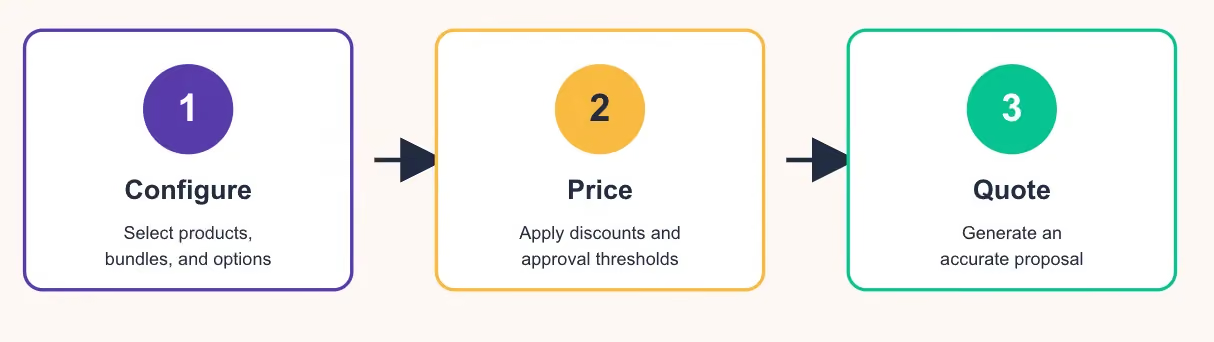
Salesforce CPQ (Configure, Price, Quote) helps sellers create accurate quotes by automating product selection, pricing logic, discounts, approvals, and proposal generation. It extends Salesforce Sales Cloud to manage complex sales processes for products, bundles, subscriptions, contracts, and renewals.
A typical implementation includes:
- Business process design: Map the quote-to-cash workflow, including opportunities, product selection, pricing, approvals, contracts, renewals, and billing. Understanding the process first prevents unnecessary complexity.
- Product catalogue: Define product families, SKUs, bundles, options, required components, subscriptions, regional availability, and currencies. A structured catalogue ensures accurate quotes, smooth renewals, and simplified reporting.
- Pricing configuration: Translate commercial pricing into CPQ rules, including standard, volume, subscription, contracted, partner, and regional pricing, with documented approval thresholds.
- Workflow automation: Set up discount, margin, and executive approvals. Automation enforces governance while reducing manual effort.
- Data migration & integration: Move products, price books, accounts, contracts, subscriptions, and historical quotes. Integrate CPQ with ERP, billing, revenue recognition, tax, and e-signature systems. Connecting Salesforce CPQ with Everstage also allows revenue teams to automate commission calculations while keeping payouts aligned with approved deals.
- Testing & governance: Validate quotes, approvals, renewals, amendments, integrations, and permissions. Establish governance to manage pricing, product, workflow, and rule updates post-launch.
Key Features of Salesforce CPQ
Salesforce CPQ is packed with features designed to make your life easier and your sales process more efficient. Highlights include:
- Product Configuration: Easily configure products and services based on customer needs and be sure to be accurate every time.
- Pricing Rules: Simplify the pricing process and set up pricing rules to automatically apply discounts, promotions and special offers.
- Quote Generation: Create professional-looking quotes with just a few clicks, complete with branding and customized messages.
- Guided Sales: Provide sales representatives with guided sales display tools to help them recommend the right products and services to each customer.
- Contract Management: Smoothly integrate with Salesforce Contract Management to manage contracts and renewals from within the CPQ platform.
Who Should Use This Salesforce CPQ Handbook?
This guide is useful for anyone involved in Salesforce CPQ implementations, including sales teams, revenue operations, finance, and Salesforce administrators. It helps organisations plan, optimise, and scale CPQ workflows while connecting deal data across the quote-to-revenue lifecycle, including sales compensation processes managed by platforms like Everstage.
The Salesforce CPQ Implementation Process
Implementing Salesforce CPQ may seem complex at first, but a structured approach ensures a smooth rollout. Below is a lean, step-by-step overview:
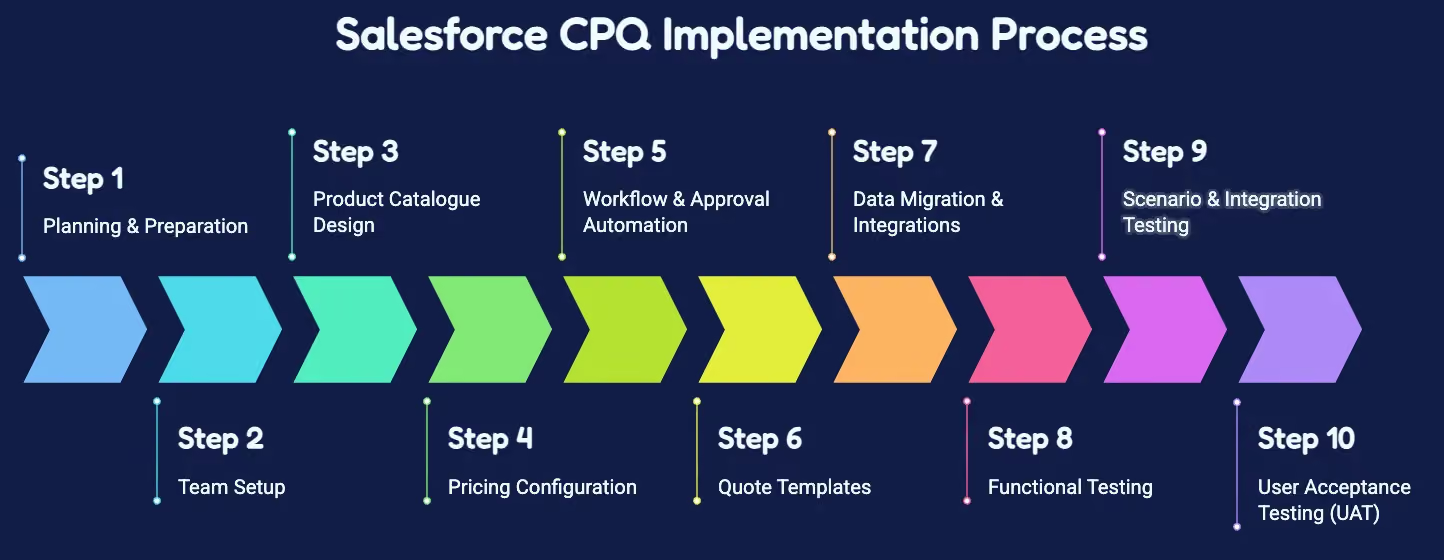
Step 1: Planning and Preparation
Before configuration, define your objectives and goals for implementing CPQ. Map the existing sales process to identify bottlenecks and areas for improvement. Gather input from key stakeholders, including sales, finance, revenue operations, and IT, to ensure alignment and a clear understanding of requirements.
Step 2: Team Setup
Identify and assign roles for the implementation:
- Executive sponsor for strategic decisions
- Salesforce administrator for configuration
- Solution architect for design decisions
- Sales operations and deal desk teams for workflow validation
- Finance and revenue teams for pricing and forecasting
- RevOps for downstream integrations and automation
Step 3: Product Catalogue Design
Define your product hierarchy, including families, SKUs, bundles, and optional components. Consider subscription offerings, regional availability, and currency rules. A well-structured catalogue ensures accurate quoting, smooth renewals, and simplified reporting.
Step 4: Pricing Configuration
Translate commercial pricing into CPQ rules:
- Standard pricing and volume discounts
- Subscription and contracted pricing
- Regional or partner-specific rates
- Discount schedules and approval thresholds
Document pricing logic to support maintainability and governance.
Step 5: Workflow and Approval Automation
Set up discount approvals, margin thresholds, and executive review workflows. Automation reduces manual errors while ensuring governance and compliance with company policies.
Step 6: Quote Templates
Create customer-facing templates that reflect brand standards. Include:
- Product details and pricing breakdown
- Subscription and contract terms
- Legal terms and signature sections
Maintain version control and approval processes for templates.
Step 7: Data Migration and Integrations
Migrate products, price books, accounts, contracts, subscriptions, and historical quotes. Integrate Salesforce CPQ with ERP, billing, revenue recognition, and e-signature systems.
Connect CPQ data to sales compensation platforms like Everstage to automate commissions, improve payout visibility, and align incentives with the deals created in CPQ.
Step 8: Testing and Training
Validate the system with:
- Simple and complex quote scenarios
- Discount and approval workflows
- Subscription changes, renewals, and amendments
- Integration points with downstream systems
Train sales teams and other users to ensure smooth adoption.
Step 9: Launch
Roll out CPQ in phases to reduce disruption. Monitor adoption and gather feedback from users to identify areas for improvement. Ensure governance processes are in place for ongoing updates and enhancements.
Step 10: Governance and Optimisation
Maintain ownership over product, pricing, and workflow rules. Monitor performance metrics and continuously refine processes. Keep CPQ aligned with business changes and revenue operations, including compensation workflows supported by Everstage.
Step 11: Test the Complete Salesforce CPQ Workflow
Testing ensures the CPQ system handles all commercial scenarios accurately before launch.
Functional Testing: Validate product selection, bundles, pricing calculations, discounts, approvals, and quote generation.
Scenario Testing:
- Simple Transaction: Standard product, standard pricing, no discount
- Complex Enterprise Deal: Multiple products, custom pricing, approval requirements
- Subscription Deal: Annual contracts, renewals, expansions
- International Deal: Multi-currency, regional pricing, local requirements
Integration Testing: Validate ERP data exchange, billing workflows, revenue systems, compensation workflows, and reporting.
User Acceptance Testing (UAT): Business users verify sales workflows, manager approvals, deal desk processes, and finance requirements. Create test scenarios, expected outcomes, issue tracking, and approval sign-offs.
Step 12: Salesforce CPQ Data Migration Guide
Data migration is high-risk. Moving inaccurate or outdated commercial data can create long-term issues.
What to Migrate:
- Products: SKUs, families, relationships
- Pricing: Price books, pricing records, discounts, contracted pricing
- Customers: Accounts, opportunities, contacts
- Contracts: Active contracts, subscriptions, renewal dates
Data Cleansing: Remove duplicates, outdated pricing, missing fields, incorrect relationships, and inactive offerings.
Migration Sequence:
- Foundation data
- Product catalogue
- Pricing records
- Customer information
- Contracts
- Subscriptions
- Historical records
Validation: Check record counts, relationships, pricing accuracy, contract values, subscription dates, and integration identifiers.
Step 13: Migrating from Salesforce CPQ to Revenue Cloud Advanced
Revenue Cloud Advanced extends Salesforce CPQ into a broader revenue lifecycle.
Reasons to Migrate:
- New monetisation models
- Increasing product complexity
- Growing subscription operations
- Multiple sales channels
- Broader revenue workflows
Salesforce CPQ vs Revenue Cloud Advanced:
Salesforce CPQ Implementation Best Practices
- Design Processes Before Configuration: Map the complete quote-to-cash process before configuring CPQ. Technology should support the business process, not the other way around.
- Maintain a Clean Product Catalogue: Avoid duplicate SKUs, outdated products, and unclear ownership. Structured catalogues reduce quoting errors and simplify renewals.
- Document Pricing Logic: Clearly define standard, volume, subscription, and contracted pricing rules, including approval thresholds. Proper documentation ensures future maintainability.
- Automate Approval Workflows: Set up discount, margin, and executive approvals to reduce manual errors while enforcing governance.
- Integrate With Downstream Systems: Connect CPQ to ERP, billing, revenue recognition, and e-signature platforms. Integrate with sales compensation tools like Everstage to ensure accurate incentive calculations.
- Test Across Scenarios: Validate simple and complex deals, subscription changes, renewals, amendments, multi-currency deals, and all integrations.
- Establish Governance: Maintain ownership of products, pricing rules, workflows, and approvals. Continuously monitor and refine processes.
Common Salesforce CPQ Implementation Mistakes
Common mistakes include configuring before process design, poor data quality, overcomplex rules, skipping testing, ignoring renewals, and missing integration checks. Let's look at each one below:
Configuring Before Understanding Processes
Mistake: Automating workflows without first mapping sales and revenue processes creates unnecessary complexity.
Solution: Begin by documenting your full quote-to-cash process. Understand how opportunities are created, products are selected, pricing is applied, and approvals flow. This ensures CPQ configuration aligns with actual business operations.
Poor Data Quality
Mistake: Migrating duplicate, outdated, or incomplete data can cause errors in quotes, contracts, and compensation.
Solution: Audit and clean all product, pricing, customer, and contract data before migration. Remove duplicates, correct missing fields, and verify relationships to ensure accurate and reliable CPQ workflows.
Overcomplex Rules
Mistake: Excessive product or pricing rules are difficult to maintain and test.
Solution: Simplify rules by evaluating which are essential for business needs. Use standard CPQ features where possible and document any custom logic to reduce maintenance burden.
Skipping Testing
Mistake: Testing only simple quotes misses complex scenarios, subscription amendments, and integrations.
Solution: Conduct thorough functional, scenario, integration, and user acceptance testing. Validate multiple deal types, subscription changes, renewals, and multi-currency transactions.
Ignoring Renewals and Amendments
Mistake: Subscription-based businesses often fail to plan for lifecycle changes from the start.
Solution: Include renewals, upgrades, downgrades, and amendments in your CPQ configuration and testing. Plan for recurring revenue changes to prevent errors in billing and reporting.
Neglecting Integration Needs
Mistake: Failing to connect CPQ with ERP, billing, and compensation systems creates downstream errors.
Solution: Map all integrations early. Ensure data flows correctly between CPQ, ERP, billing platforms, revenue recognition systems, and reporting tools to maintain end-to-end accuracy.
Overlooking Sales Compensation Workflows
Mistake: Inaccurate deal data can disrupt commission calculations and incentive alignment.
Solution: Connect CPQ outputs to sales compensation platforms like Everstage. This ensures commission calculations are automated, payouts are visible in real time, and seller incentives align with actual deals.
Implementation Timeline & Cost Considerations
Implementing Salesforce CPQ involves multiple steps, and the timeline and cost can vary depending on business complexity, data quality, and integrations. Below are the key considerations:
Timeline Factors
- Business Complexity: More products, pricing rules, and bundles increase setup time.
- Data Quality: Clean, well-structured product and customer data reduces delays.
- Integrations: Connecting CPQ to ERP, billing, revenue recognition, and e-signature systems (including Everstage for sales compensation) adds implementation time.
- Workflow Complexity: Multi-level approvals, discount rules, and subscription management increase configuration and testing efforts.
- Training & Adoption: Allocating time for user training and change management ensures smooth adoption.
Typical Duration:
- Small to medium implementations: 6–12 weeks
- Complex enterprise implementations: 3–6 months
Cost Considerations
- Licensing: Revenue Cloud Growth starts at $150/user/month, while Revenue Cloud Advanced starts at $200/user/month. In practice, organisations should budget for a significantly higher total cost once the required Salesforce platform licenses are included. Internal research indicates total CPQ licensing costs can exceed $365 per user/month, depending on the Salesforce products deployed.
- Implementation Services: Enterprise implementations commonly require systems integrators and can range from $75,000 to $800,000, depending on complexity, integrations, and customisation.
- Data Migration & Integration: Clean-up, validation, and connecting systems (ERP, billing, Everstage) can significantly affect costs.
- Training & Change Management: Ensuring your teams are confident in using CPQ is critical for ROI.
- Ongoing Maintenance: Organisations should also budget for ongoing Salesforce administration and consulting. Depending on implementation complexity, annual maintenance can range from $96,000 to $144,000, particularly where external consultants manage pricing rules, workflows, and platform updates.
Checklist for Choosing the Right Salesforce CPQ Implementation Partner
Selecting the right partner can significantly impact the success, speed, and ROI of your CPQ implementation. Consider the following factors:
1. Experience and Expertise
- Proven track record with Salesforce CPQ implementations.
- Deep understanding of product catalogue structuring, pricing rules, and subscription workflows.
- Experience integrating CPQ with downstream systems, including ERP, billing, and Everstage for sales compensation.
2. Industry Knowledge
- Familiarity with your business vertical and typical deal complexities.
- Understanding of revenue operations and sales processes specific to your organization.
3. Implementation Methodology
- Structured, phased approach to minimize disruption.
- Strong focus on testing, training, and change management.
- Support for both on-site and remote teams.
4. Integration Capabilities
- Ability to connect CPQ with other systems in your tech stack.
- Experience with automation for commission calculations, reporting, and revenue workflows.
5. Post-Implementation Support
- Ongoing governance and support for new product launches, pricing updates, and workflow changes.
- Ability to monitor adoption and help optimize CPQ usage for maximum ROI.
Driving Revenue and Accuracy with Salesforce CPQ
Implementing Salesforce CPQ effectively requires more than configuring products and pricing—it demands a strong foundation in process design, clean and accurate data, structured catalogues, automated workflows, and thorough testing. Following best practices and avoiding common mistakes ensures your CPQ system is reliable, scalable, and aligned with your business goals.
Connecting Salesforce CPQ to downstream systems, particularly Everstage, allows your revenue and sales teams to automate commission calculations, maintain accurate payouts, and align incentives with actual deal outcomes. This integration transforms CPQ data into actionable insights and reduces manual reconciliation, creating a seamless quote-to-revenue workflow.
Whether you are implementing CPQ for the first time, optimizing an existing deployment, or planning a migration to Revenue Cloud Advanced, focusing on process, governance, and integrations ensures efficiency, accuracy, and measurable results.
Book a demo with Everstage today
Questions worth asking
The things most people want to know before they commit.
Is Salesforce CPQ Still Available?
Salesforce CPQ remains available for existing customers. Salesforce has shifted strategic investment toward Revenue Cloud, but existing customers can continue using Salesforce CPQ.
Does Salesforce Require Existing CPQ Customers To Migrate?
No. Salesforce has stated that existing Salesforce CPQ customers are not required to migrate immediately. Migration decisions depend on business requirements and future revenue needs.
Can Salesforce CPQ Connect With Sales Compensation Platforms?
Yes. Organisations can connect commercial data from CPQ workflows with sales compensation platforms to support commission calculations, incentive management, and payout processes.
How do I track incentives for partial or amended deals?
By connecting Salesforce CPQ to Everstage, commissions can automatically adjust when contracts are amended, renewed, or partially fulfilled, reducing manual reconciliation.
Can CPQ approvals be dynamically adjusted based on deal size or region?
Yes. CPQ supports dynamic approval workflows. These rules can be configured to scale for high-value deals, multi-region transactions, or complex subscriptions, and Everstage can reflect these adjustments in commission calculations.
Can Everstage handle multi-currency commissions from CPQ deals?
Absolutely. When CPQ quotes are in multiple currencies, Everstage can convert values and calculate commissions accurately according to configured rules, simplifying international incentive management.