TL;DR
- QuotaPath is a commission tracking tool built for small and mid-sized sales teams, praised for published pricing, fast setup, and a genuinely easy-to-use interface.
- The advertised per-user pricing does not tell the whole story. Higher tiers add a platform fee on top of the per-seat rate, and at least one reviewer has publicly called the pricing page misleading as a result.
- QuotaPath's ceiling shows up at scale: reviewers flag limited integrations (Salesforce, Close, and HubSpot only), manual processes for more advanced plan types, and reporting depth that falls short of GAAP and ASC 606 needs.
- Support responsiveness is a genuine strength, with reviewers describing same-day help from the QuotaPath team even during onboarding.
- Teams that start on QuotaPath and outgrow its plan-complexity ceiling will find Everstage built for exactly that next stage, with deeper reporting, broader integrations, and a no-code builder designed for enterprise-scale plans.
Book a demo with Everstage to see the results yourself.
QuotaPath reviews describe a tool that does what it promises for straightforward commission tracking. Setup is fast, the interface doesn't require a technical background, and published pricing makes early budgeting easier than the sales-led alternatives in this category.
Where it gets complicated is growth. The teams walking away from QuotaPath are usually the ones whose plans outgrew basic tiers and accelerators, who needed integrations beyond a small set of CRMs, or who were caught off guard by a platform fee that wasn't obvious on the pricing page.

Knowing where those limits sit is what this review aims to answer. We'll cover:
- What QuotaPath is and who it's built for
- How its features hold up against real user feedback
- What the pricing looks like across all three tiers, including the platform fee
- How it compares to Everstage on features and cost
How We Sourced Our Data
This review draws on QuotaPath's own pricing and product pages alongside third-party analysis from B2BSalesTools, Toolradar, and IncentiveOps. User feedback was sourced from G2 and Capterra, covering hundreds of verified reviews across company sizes.
The evaluation focused on pricing transparency, plan-complexity ceiling, integration depth, and reporting capability, measured against where reviewers consistently say the platform starts to strain.
QuotaPath Features: A Closer Look
QuotaPath holds a strong reputation for accessibility, with G2 ratings in the 4.7 range across a review base that skews toward small and mid-sized teams. That accessibility is real, but it comes with real limits once plans get more complex.
1. Plan Building and Setup Speed
QuotaPath's plan builder covers tiered rates, accelerators, quotas, SPIFFs, and basic split commissions out of the box, with an AI-powered plan builder that can extract components directly from an uploaded compensation document or a plain-text description.
One G2 reviewer described building out a full year of historical plans plus the following year's plans within about six weeks, well ahead of the three months their team had originally budgeted, crediting the platform's intuitiveness during the trial itself
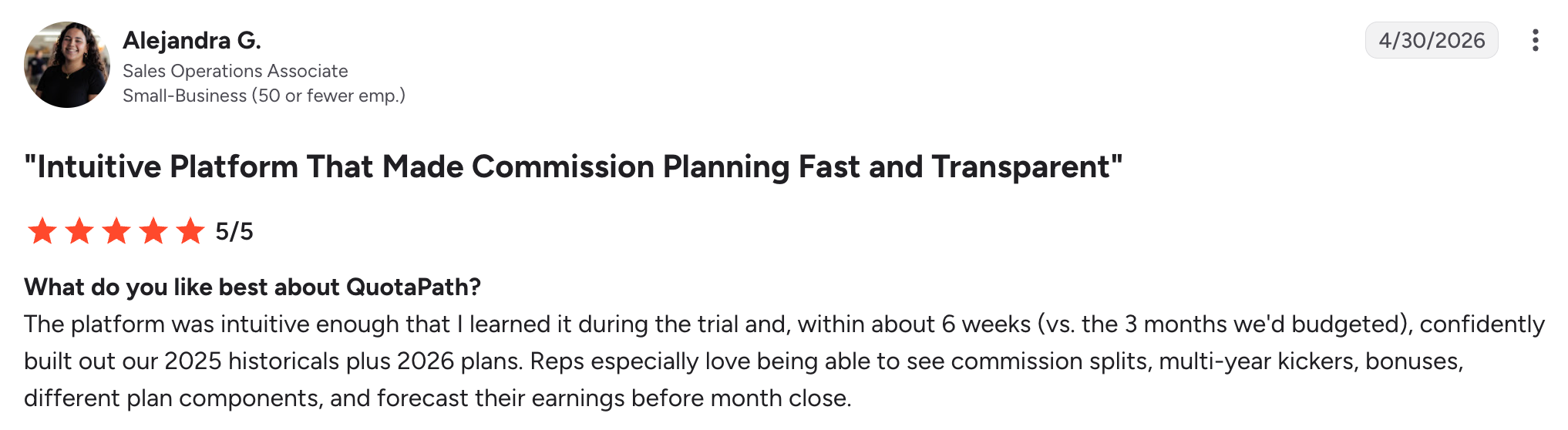
Reviewers do note a small learning curve each time a new use case gets set up, though most describe support as filling that gap quickly, often with a same-day Loom video walkthrough rather than a lengthy ticket process

Setup for standard plans is genuinely fast. Where it slows down is anything outside the core tiered-rate and accelerator model.
2. Reporting, Integrations, and Scaling Limits
A QuotaPath reviewer praises the platform's clear, organized reporting, but wishes sign-in didn't require a company-specific link.

One G2 reviewer noted that with so much packed into the platform, there's a real learning curve to using and visualizing everything effectively, and that the integration process can feel complicated at first, though it gets easier with time.

3. Pricing Transparency, and Where It Breaks Down
One Capterra reviewer described the pricing page as misleading, explaining that the site displays three clear per-user tiers, only for the actual cost to land to be ten to twenty times higher than what the page implied once platform fees were added, calling the experience a waste of time spent on a service that turned out far more expensive than advertised.
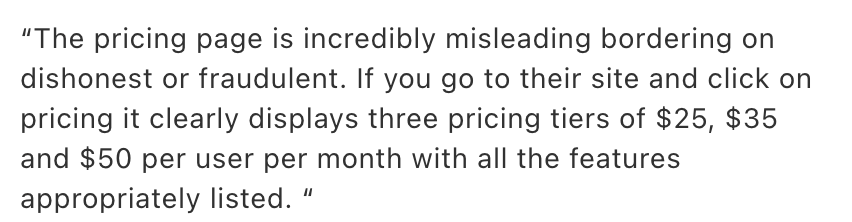
That gap between the sticker price and the real invoice is worth budgeting around before treating QuotaPath's published rate as the full cost.
QuotaPath Pricing and Plans
QuotaPath is one of the few vendors in this category that publishes rates directly on its website, a genuine point of differentiation from CaptivateIQ, Spiff, and Xactly, all of which require a sales conversation before any number appears.
1. Growth Plan
The Growth plan starts at $35 per user per month, plus a monthly platform fee, and is built for smaller teams on Salesforce or HubSpot that need custom plan building and payouts.
It includes quota tracking, leaderboards and contests, manager and team owner plans, plan verification, calculated fields, multi-currency support, ASC 606-compliant ledger support, and single-source payout eligibility.
2. Premium Plan
Premium runs $50 per user per month, plus the same monthly platform fee, and is aimed at teams managing more complex commission structures with deeper integration needs.
It includes everything in Growth, plus plan modeling, multi-level approvals, custom reporting, automated commission payroll sync (including HRIS platforms like Rippling), API access, SSO, and multi-source payout eligibility.
3. Strategic Plan and the Platform Fee
Strategic is QuotaPath's fully managed tier, listed as "Coming Soon" and priced on a custom basis scoped to team size and needs. Rather than just unlocking more features, it bundles the Premium plan with Atlas (QuotaPath's AI compensation strategist) and adds a dedicated comp analyst who handles end-to-end plan design, monthly commission runs, dispute resolution, and scenario forecasting on the customer's behalf.
Separately, Atlas is available as an add-on to either Growth or Premium, starting at $5,000, for AI-assisted plan design, scenario modeling, and benchmark-backed recommendations.
4. How This Compares to Everstage
QuotaPath's transparency is real, but it comes with a caveat every buyer should price in: the platform fee sits on top of the per-user rate at both live tiers, and Atlas, the AI layer that QuotaPath is actively pushing as its differentiator, is a costly add-on instead of something included at the published price point.
Everstage takes the opposite approach: AI-powered planning (headcount, capacity, quota, and territory modeling) is built into the core platform instead of being sold separately, and there's no stacked platform fee to budget around at the seat level.
On G2, Everstage also edges out QuotaPath on both Ease of Setup (9.6 vs. 9.3) and overall rating (4.8 vs. 4.7), suggesting that Everstage's all-in quote may take one more step to reach, but tends to bring fewer line-item surprises once a team is actually live.
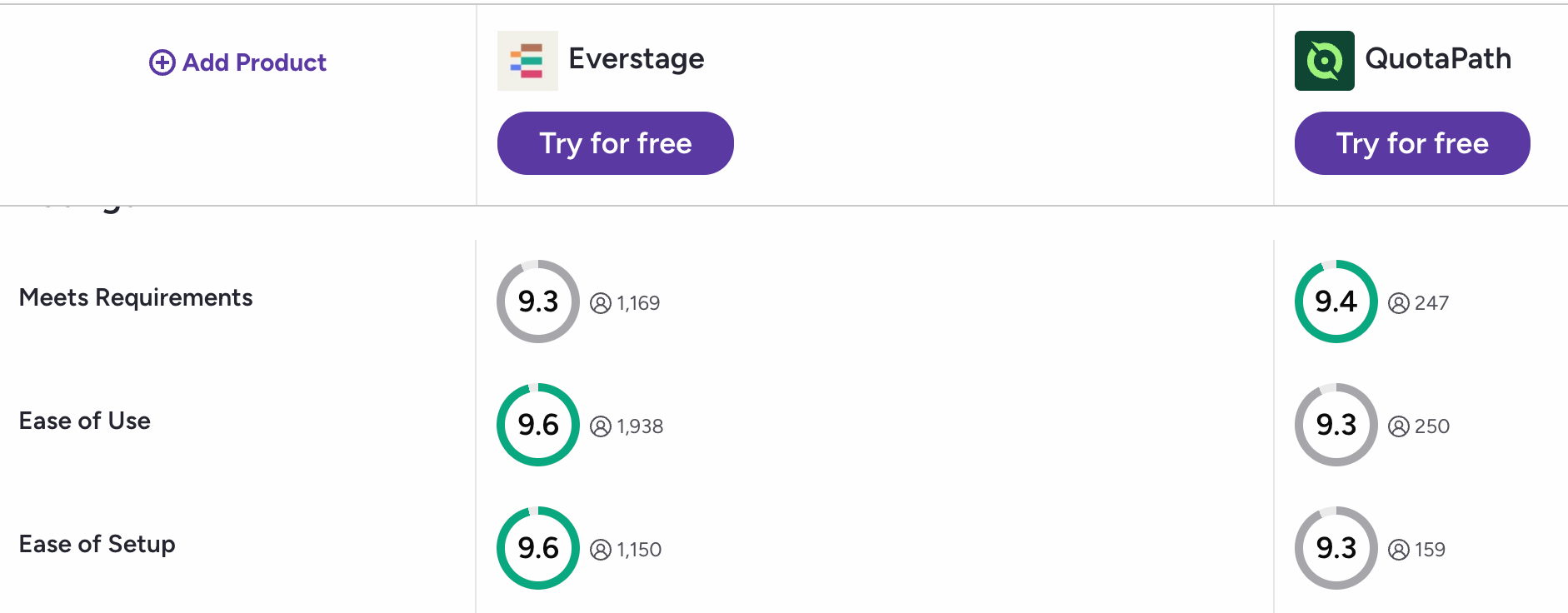
The published numbers give buyers a real starting point most quote-only competitors don't offer. The detail worth confirming directly during a sales call is exactly what the platform fee covers at your seat count, and whether AI plan design needs to be a separate purchase at all.
QuotaPath vs. Everstage: Feature Comparison
QuotaPath is built for teams just leaving spreadsheets behind. Everstage is built to keep working as those same teams scale into real complexity. The table below shows where that difference shows up.
QuotaPath's AI-Powered Plan Builder can extract plan components from an uploaded document, letting admins model and publish changes without an IT ticket, though the more advanced Atlas AI layer sits behind a separate add-on fee.
Everstage builds AI-powered planning into the core platform rather than as a paid extra, and pairs its no-code philosophy with guided implementation, ongoing 24x5 multi-channel support, and quarterly ROI reviews built into the relationship rather than left to self-serve.
What Do Users Say About Everstage?
Everstage receives consistently strong ratings across major software review platforms.
What Does Everstage Do Well?
Users consistently highlight four strengths:
- Clear commission and quota visibility for sales reps
- Accurate, rules-based commission calculations
- Reduced spreadsheet work and manual administration
- Easy-to-use dashboards with responsive customer support
Let’s look at each of these areas in more detail.
1. Clear Commission Visibility for Reps
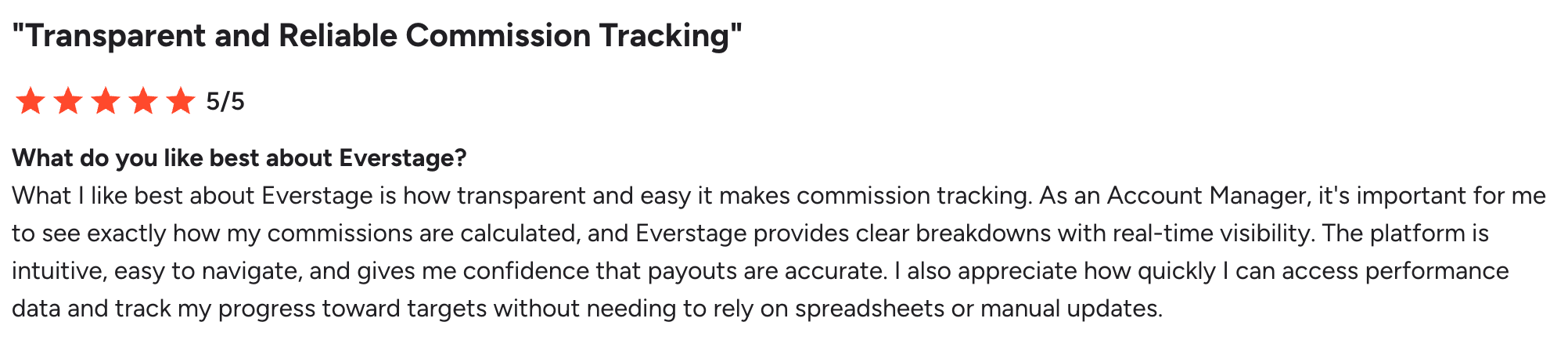
The most consistent positive theme is transparency. Sales reps say Everstage helps them understand how commissions are calculated, track quota progress, and see expected payouts without maintaining separate spreadsheets.
One reviewer highlighted clear payout breakdowns, real-time visibility, and greater confidence in commission accuracy.
Another reviewer notes that the CRM-connected view removed the need for shadow-accounting spreadsheets and helped model potential deal earnings.
This is where Everstage’s payee experience appears to deliver the clearest everyday value.
2. Accurate Calculations and Reduced Manual Work
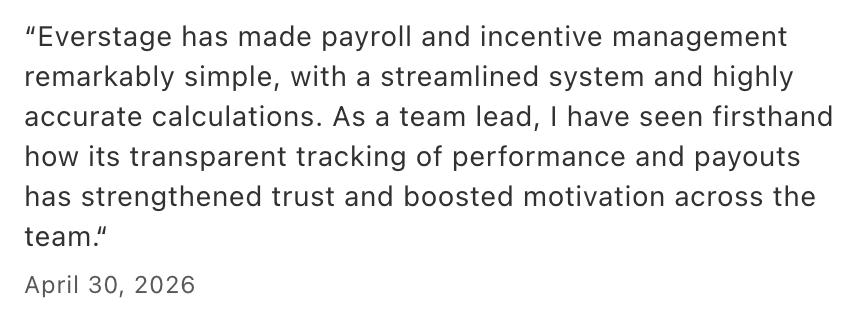
Finance, RevOps, and sales users frequently mention calculation accuracy and time savings. Capterra reviewers describe fewer spreadsheets, reduced payout confusion, and less manual back-and-forth once the platform is configured.
TrustRadius reviews from 2026 similarly mention accurate commission calculations, easier manager dashboards, reduced manual input, and faster access to performance information.
These benefits align closely with Everstage’s sales compensation automation capabilities.
3. Stronger Controls for Finance and Compensation Teams
Admin-focused reviews highlight plan management, structured calculations, dashboard visibility, integrations, and the ability to trace compensation logic.
A June 2026 G2 reviewer said Everstage made complex logic and data flows easier to build and explain without requiring SQL knowledge. Other reviewers highlighted smooth integrations, responsive support, and clearer compensation reporting.
For Finance teams, the value extends beyond dashboards to more structured reporting and analytics, payout governance, and reconciliation.
4. Reporting, Syncing, and Configuration Are Common Tradeoffs
The reviews are not universally positive. The most common concerns relate to:
- Advanced reporting and dashboard customization
- Occasional CRM or data-sync delays
- A learning curve for complex configurations
- Reliance on support for certain changes
- Additional clicks or repetitive admin actions
- Historical-data migration and change management
A Capterra reviewer praised the interface and customer support but reported limitations in report customization and long daily sync times.
A G2 reviewer similarly mentioned CRM-sync delays and a steep learning curve for advanced reporting.
One enterprise G2 reviewer also described an implementation problem caused by incomplete stakeholder involvement, reinforcing the importance of documented requirements and internal ownership during rollout.
Buyers should therefore assess potential implementation challenges alongside the product’s features.
Overall Review Takeaway
Everstage performs best for teams that need accurate commissions, clearer payout visibility, and less spreadsheet work.
The main tradeoffs are reporting flexibility, complex setup, data migration, and implementation effort.
QuotaPath vs. Everstage: Which platform fits your business?
1. Team Size and Structure
QuotaPath fits small and mid-sized sales teams that want published pricing, a fast self-serve setup, and straightforward tiered-rate or accelerator plans without a lengthy procurement process.
Everstage fits larger sales organizations and scaling mid-market teams with complex, multi-tier, or frequently changing compensation structures that need a no-code builder, deeper reporting, and audit-ready compliance without bringing in outside specialists.
2. When to Choose Each
QuotaPath is the stronger choice when a team's commission logic is genuinely simple, budget predictability matters more than deep customization, and the CRM footprint stays within Salesforce, Close, or HubSpot.
Everstage is the stronger choice once plans start layering in multi-tier accelerators, split credits, multiple data sources, or compliance requirements like ASC 606, and when a team wants a partner that manages implementation directly rather than leaving it to self-serve configuration.
Decide if QuotaPath Is Worth Your Investment
QuotaPath earns its reputation honestly for small and mid-sized teams: published pricing, fast setup, and a genuinely easy interface make it one of the more approachable tools in this category.
The honest verdict is that the approachability has a ceiling. Between the platform fee that isn't obvious on the pricing page and the reporting gaps reviewers describe hitting as plans mature, teams that expect to scale past basic commission tracking may find themselves migrating sooner than planned.
Teams that have outgrown QuotaPath's plan-complexity ceiling, or that need reporting depth built for scale from day one, will find Everstage covers that broader ground at a comparable level of ease of use.
If your commission plans are about to get more complex than a tiered rate and an accelerator, Everstage is worth a closer look. Book a demo with Everstage to see how it handles your real plans, not just a sales demo script.
Frequently asked questions
Does QuotaPath support Slack or Microsoft Teams notifications?
QuotaPath doesn't publicly document native Slack or Teams payout alerts. Confirm this directly with their sales team if in-app notifications matter for your rollout, since it's not listed as a standard feature.
Can QuotaPath handle multi-currency commission plans?
Yes, multi-currency support (Rep's Currency Support) is included starting at the Growth tier, making it viable for teams paying commissions across different regions without an add-on.
How long does QuotaPath implementation typically take?
Reviewers report building a full year of historical plans plus the next year's plans in about six weeks, notably faster than teams typically budget for a comp tool rollout.
Is there a free trial for QuotaPath?
Yes, QuotaPath offers a free trial so teams can test plan building and payouts before committing, a real advantage over quote-only competitors that require a sales call first.
What happens if my team outgrows QuotaPath's Growth or Premium tiers?
Growth and Premium are QuotaPath's only live tiers today (Strategic is "Coming Soon"). Teams needing enterprise-scale reporting or AI planning built in, rather than as an add-on, should compare options like Everstage before committing long-term.