.avif)
TL;DR
Create a sales territory map to optimize your sales team’s focus, efficiency, and overall performance by clearly defining territories.
- Eliminate overlap and wasted time by assigning specific areas to each rep
- Balance workloads to prevent burnout and ensure fairness across regions
- Enhance productivity by reducing travel time with optimized territories
- Identify untapped opportunities by visualizing your team’s coverage and gaps

What Is a Sales Territory Map and How Does It Work?
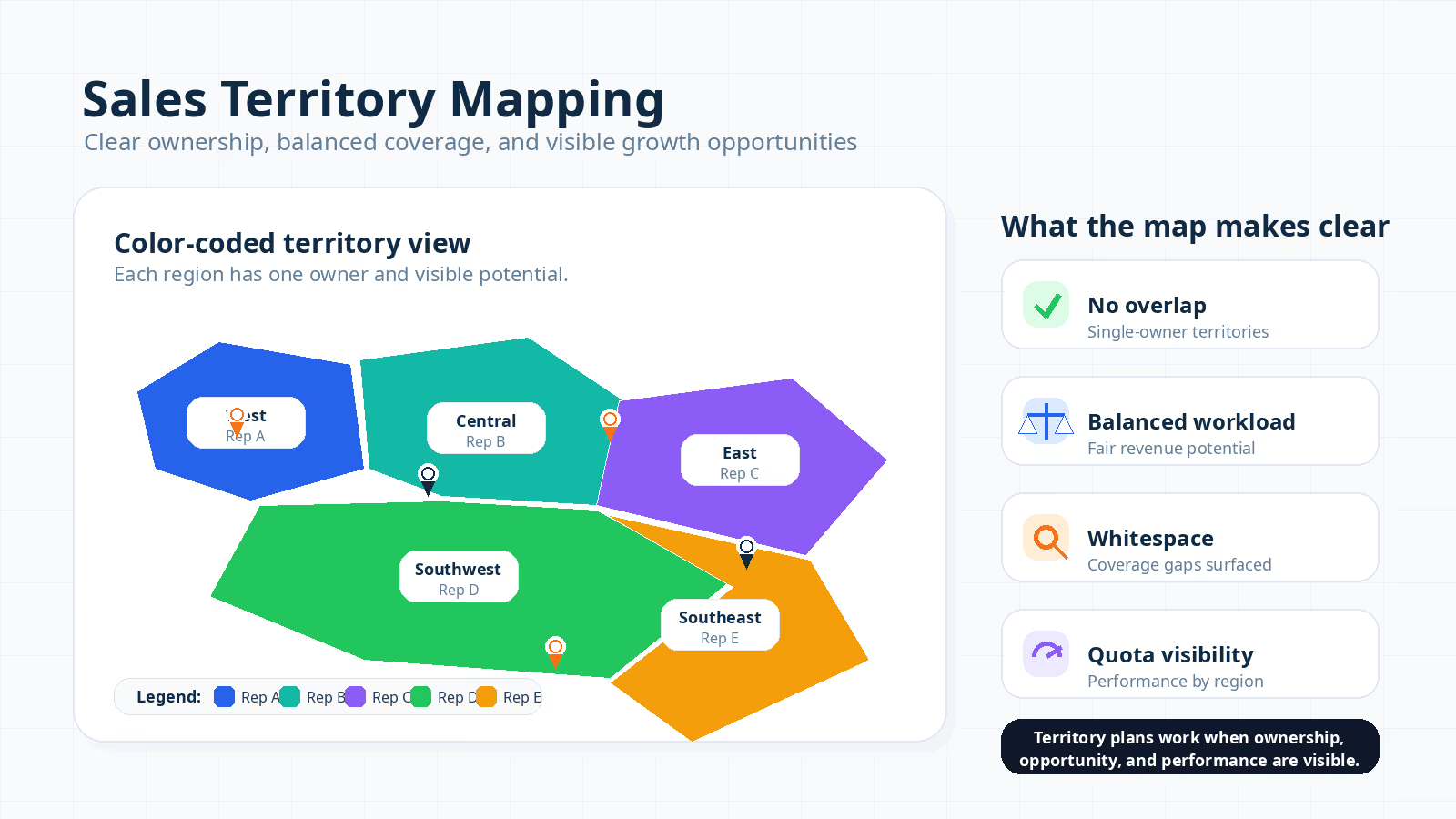
A sales territory map is a visual tool organizing sales coverage by region or customer segment. Mapping out specific areas lets companies assign clear ownership to each rep, which reduces overlap and improves efficiency across the team.
The primary benefit is transparency: every rep sees which customers or regions belong to them. Transparent assignments lead to efficient outreach and fair workload distribution. They also help leadership target regions with the highest growth potential.
A sales territory map connects directly to increased efficiency and business growth. When reps know their exact responsibilities, they focus with precision. Focused effort produces higher close rates and stronger customer relationships.
Sales territories can be designed in several ways, depending on the needs of the business. For a deeper grounding in how territory design principles translate into day-to-day management, Everstage's guide to sales territory management walks through the operational decisions RevOps teams face at every stage.
Different Ways Sales Territories Can Be Defined
Geographic boundaries and account-based segmentation represent two of the most common territory models. The right model depends on a company's sales motion, customer distribution, and revenue goals.
Understanding these structural options is essential before selecting mapping tools. The most common models used to define sales territories are listed below.
- Geographic Territories
Geographic territories are based on physical locations such as cities, states, or countries. Field sales teams and businesses serving localized service areas benefit most from this model.
A national SaaS company expanding into new markets might assign each rep to a specific region, like the Northeast or West Coast. Each rep then focuses on a distinct area aligned with regional demand patterns.
- ZIP Code-Based Territories
ZIP code segmentation offers a granular, data-driven approach popular in real estate and B2B tech. Companies requiring precise tracking find ZIP code boundaries ideal.
Breaking areas down to individual ZIP codes ensures fair distribution and measurable coverage. Reps receive assignments with clear, quantifiable boundaries.
- Industry or Vertical Territories
Some businesses assign reps based on verticals such as healthcare or finance. Reps with specialized knowledge in a given field perform best under this model.
Vertical-based assignments let reps build deeper client relationships and deliver tailored solutions. Credibility and close rates improve as a result.
- Account-Based Territories
In enterprise sales or Account-Based Marketing (ABM) models, companies assign territories around high-value accounts or strategic clients.
Dedicated reps focus on nurturing long-term relationships and closing large deals. Mid-market and enterprise B2B organizations targeting fewer, higher-value clients benefit most from this structure.
- Hybrid Territories
Some companies combine two or more criteria to create hybrid territories. A fast-scaling SaaS business might pair geography with industry, or ZIP codes with deal size.
Hybrid models balance opportunity distribution while letting reps specialize. They offer flexibility and help leadership direct effort toward the highest-potential segments.
Once you know how territories can be defined, the value of effective mapping becomes clear. Well-designed territories keep reps focused on the right accounts and ensure workload stays balanced.
Benefits of Creating a Sales Territory Map for Productivity & Growth
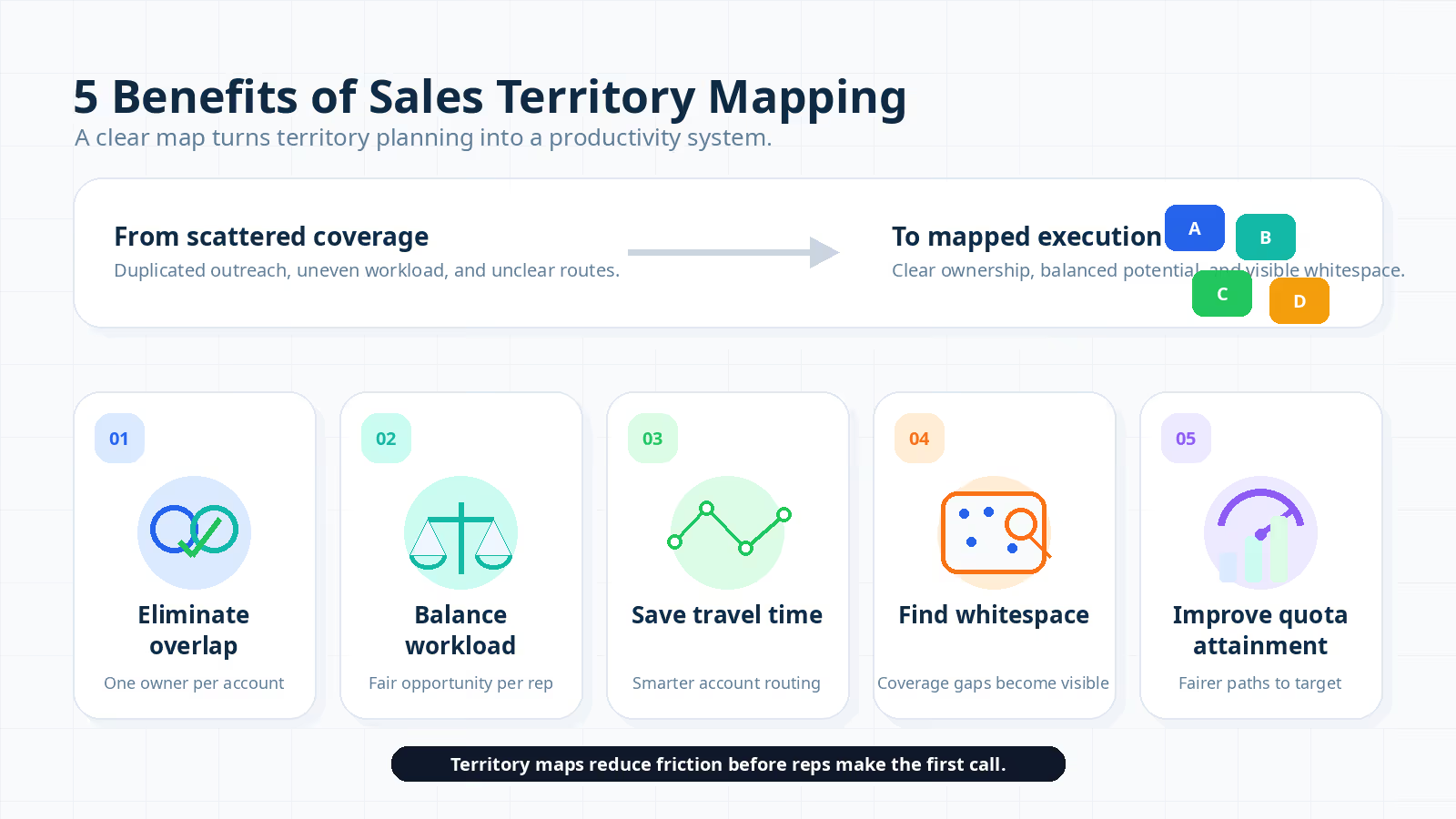
Reduced overlap and balanced workloads rank among the top benefits of a structured sales territory map. Clear boundaries cut operational friction and boost team morale. The data backs this up: Salesforce's State of Sales (6th Edition, 2024-25) found only 28% of sales reps expect to hit annual quota, the lowest figure in six years. The data backs this up: Alexander Group research found that sales organizations thoughtfully designing and optimizing their territories realize 10-20% increases in sales productivity.
Misaligned territory design is one of the structural reasons reps fall short: when accounts are unevenly distributed or boundaries overlap, reps lose time and motivation before they make a single call.
The key advantages of creating a sales territory map are covered below.
1. Eliminates Overlap: Reps Focus on Their Accounts
Territory overlap and duplicated outreach waste time and confuse customers. Multiple reps targeting the same account leads to inconsistent communication and missed deals.
A defined territory map ensures each rep knows their assigned accounts. Reps then concentrate on building relationships and closing deals without redundant effort.
2. Balances Workload: No Rich vs. Poor Territories
Unbalanced territories breed frustration and inequity within a sales team. Reps in high-revenue areas risk burnout, while those in low-potential zones struggle to meet quota.
A well-designed map distributes accounts so each territory carries balanced revenue potential and workload demands. Fair distribution fosters motivation and sustained engagement.
3. Saves Travel Time: Optimized Routing
Unoptimized routes cost field reps hours each week and reduce face-to-face selling time. A territory map enables efficient route planning to minimize unnecessary travel.
Clustering accounts in specific areas lets reps visit more clients in fewer hours. Increased client-facing time directly improves close rates and deal velocity.
4. Increases Visibility into Whitespace Opportunities
Coverage gaps and underserved customer segments become visible when territories are mapped. Visualizing sales coverage on a map reveals regions overlooked or under-targeted.
Leadership can then redistribute resources or direct effort toward high-promise areas. Expanding into whitespace drives increased market share and revenue growth.
5. Improves Quota Attainment and Team Morale
Balanced territories and clear ownership directly improve sales quota attainment. Reps with manageable workloads are better positioned to hit their goals.
Higher success rates translate into stronger morale. Reps who see fair opportunity distribution stay motivated and collaborate more effectively. Confident teams share insights and drive overall performance upward.
Gartner's December 2024 research reinforces this: sales organizations simplifying seller roles (including through cleaner territory structure) are 4.5x more likely to be among the top performers compared to those that do not.
Teams still running territory assignments in spreadsheets pay a hidden cost in errors and manual rework. Everstage's territory and quota planning module gives RevOps teams a no-code environment to design territories, set quotas, and push assignments directly to reps, keeping everything in sync without manual handoffs.
With these benefits established, the next section walks through how to build a sales territory map step by step.
Step-by-Step Guide: How to Create a Sales Territory Map
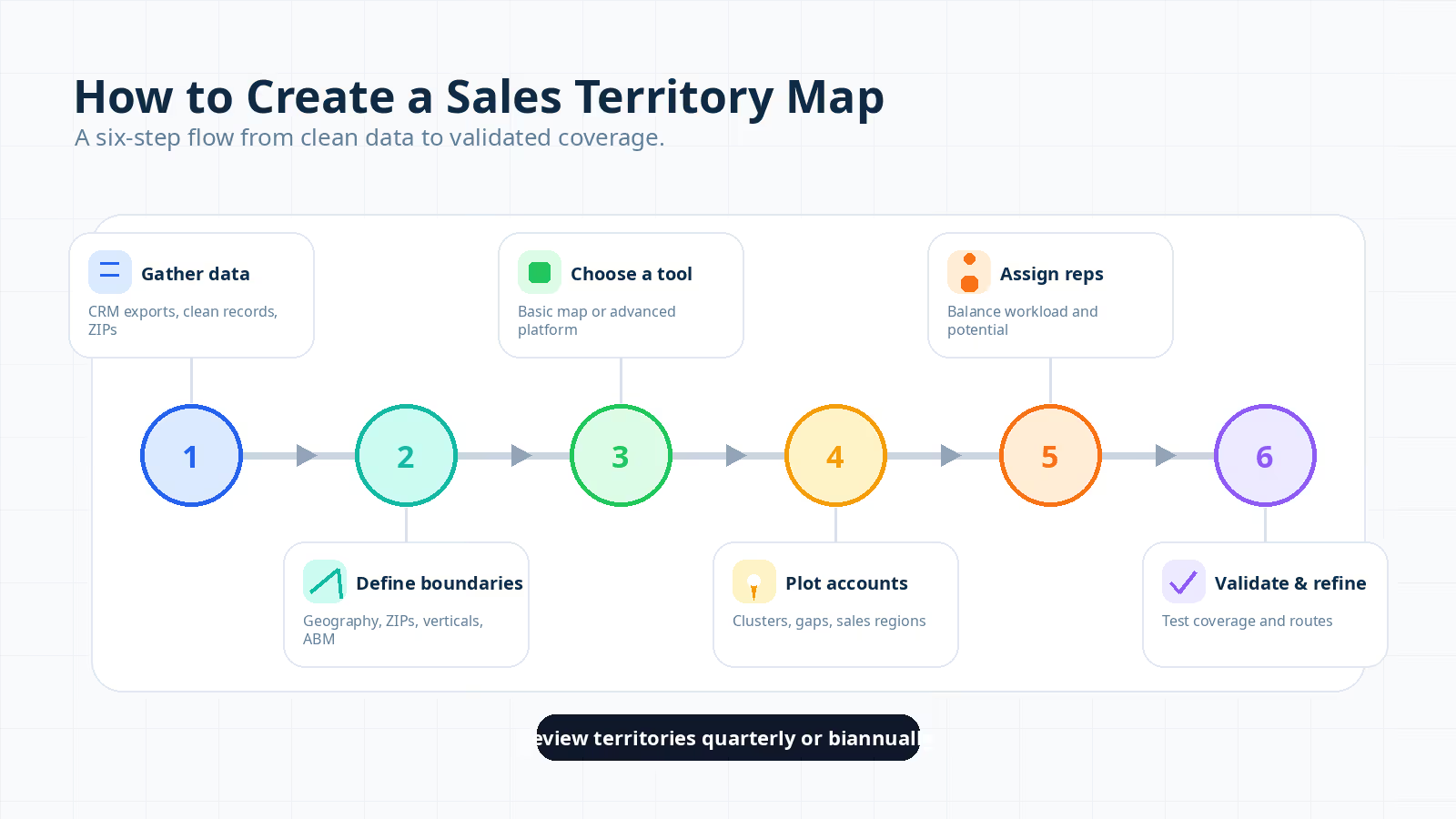
Reliable data and the right mapping tool form the foundation of an effective sales territory map. Follow these six steps to optimize coverage, improve productivity, and support long-term growth.
1. Gather and Clean Your Sales & Customer Data
Accurate CRM exports and validated addresses are prerequisites for a reliable territory map. Start with these two actions:
- CRM Exports: Export data from your CRM system, including customer names, addresses, deal size, industry, and sales history.
- Clean the Data: Remove duplicates, verify addresses, and standardize ZIP codes. Accurate data ensures reps receive correct territory assignments. Messy data produces flawed maps and operational confusion.
2. Define Boundaries Using Geography, ZIP Codes, or Industries
Boundary selection depends on your business model and sales motion. Common approaches include the following.
- Geography: Assign territories by cities, states, or countries. Companies serving broad physical locations benefit most from this approach.
- ZIP Codes: Break territories down by ZIP code for granular segmentation. Dense customer populations in retail or real estate markets make this method especially effective.
- Industries/Accounts: Assign reps to specific verticals (e.g., healthcare or finance) or named enterprise clients. Specialization builds deeper relationships within assigned segments.
- Hybrid Models: Combine criteria like geography and industry, or ZIP code and deal size. Hybrid models offer flexibility and help ensure territories are both fair and strategic.
3. Choose the Right Tool to Create a Sales Territory Map
Tool selection depends on team size, budget, and integration requirements. Two categories cover most use cases.
- Free/Basic Tools: Small teams can start with Google My Maps or basic CRM integrations in Salesforce. These tools are easy to use but lack advanced automation.
- Advanced Mapping Software: Larger teams benefit from Maptive or Salesforce Maps, which offer real-time updates, CRM integration, and heatmaps. These platforms cost more but deliver comprehensive territory management.
A strong mapping tool connects to your existing CRM and scales alongside your business.
4. Plot Customer Data Points and Sales Regions on the Map
With boundaries defined and a tool selected, plot your customer data. Depending on your platform, you can do the following.
- Upload a CSV File: Most tools accept CSV uploads to automatically plot addresses on the map.
- Manually Input Data: Smaller datasets can be entered by hand. Manual entry is time-consuming but viable for teams with fewer than 100 accounts.
- Visualize Customer Clusters & Gaps: Look for concentrations where customers cluster and zones with zero coverage. These patterns inform data-driven territory refinements.
5. Assign Sales Reps and Balance Workload Fairly
Account size and deal potential should guide rep assignments. Focus on two priorities.
- Workload and Revenue Potential: Assign territories based on account size, deal potential, and historical performance. Each rep deserves a fair chance to succeed.
- Avoid Overloading Reps: Distributing too many accounts to one rep causes burnout. A balanced workload sustains motivation and builds trust within the team.
6. Validate, Test, and Refine Your Map Design
Testing coverage and gathering rep feedback ensure the map performs as intended. Validate against three criteria.
- Check Coverage: Confirm each region is adequately covered with no territory underrepresented.
- Monitor Customer Response Time: Verify reps can respond to leads promptly. Hard-to-access areas may require boundary adjustments.
- Evaluate Rep Travel Routes: Identify reps spending excessive time on the road. Optimized routes save hours each week.
Gather feedback from sales managers and reps to surface distribution issues. Refine the map based on their input to address inefficiencies.
Sales territories should be revisited quarterly or biannually. Market shifts and new data require map adjustments to maintain relevance and effectiveness.
With the general framework in place, the next section focuses on ZIP code-based territory mapping.
Step-by-Step: Creating Sales Territory Maps by ZIP Code
ZIP code-based mapping gives reps precise, manageable coverage areas with clear boundaries. Two tool categories serve different team sizes and complexity levels.
Here is how to create a ZIP code-based sales territory map.
1. Using Google Maps for Simple ZIP-Based Territories
Google My Maps offers a free, straightforward option for small teams building ZIP code territories. Follow these steps.
- Import Data Using My Maps: Prepare a CSV file with customer names, addresses, and ZIP codes. Upload the file to Google My Maps to import the data automatically.
- Color-Code ZIP Codes: Use My Maps' styling features to color-code different ZIP codes. Visual differentiation highlights overlap and under-representation at a glance.
- Assign Reps to Defined ZIPs: After color-coding, assign each rep to their designated ZIP codes. Clear assignments minimize confusion and maximize focus.
Google My Maps works well for teams with fewer than 10 reps or businesses with limited budgets. The tool provides enough functionality for organizations that do not require advanced automation or enterprise-scale operations.
2. Advanced Tools for Bulk ZIP Uploads and Auto-Mapping
Larger teams managing thousands of accounts benefit from platforms like Maptive or Smappen. These tools offer advanced automation for complex mapping needs.
- Upload CSV with ZIP Codes: Upload a CSV containing ZIP codes and customer data. The software automatically maps these codes and generates defined sales territories.
- Auto-Create Boundaries: Advanced tools auto-generate territory boundaries based on ZIP codes. Automated boundary creation eliminates manual assignment, saves time, and ensures consistency.
Scalability is the primary advantage of these platforms. They handle large datasets efficiently, making them ideal for businesses with complex, multi-region sales operations.
ZIP code-based mapping ensures reps have clear, measurable areas to cover. Google My Maps serves as a strong starting point, while Maptive and Smappen handle bulk uploads and automated boundary creation for larger organizations.
How to Choose the Right Sales Territory Mapping Tool
Budget constraints and CRM integration requirements are two of the biggest factors in selecting a mapping tool. Whether you manage a five-person team or a 200-person sales org, the right tool reduces manual work and keeps territory data accurate. Gartner's 2024 Seller Skills Survey of 1,026 B2B sellers found 70% of sellers feel overwhelmed by the number of technologies required to do their work.
For ops leaders adding yet another disconnected tool to the stack, adoption failure is the most predictable outcome. Platforms chosen for integration quality and workflow fit, not just feature count, generate better adoption.
Below is a breakdown of the best tools based on team size, needs, and scalability.
1. Free Options: Google Maps & Excel Add-ons
Small teams and early-stage companies benefit from Google Maps and Excel add-ons, which create simple territory maps at zero cost. These tools cover basic needs without requiring a software budget.
- Google Maps (My Maps)
Google Maps lets beginners import data and plot territories by ZIP code or geographic area. Color-coded regions make rep assignments visually clear.
Pros: Free, intuitive, and accessible for teams under 10 reps.
Cons: Requires manual input, limited scalability, and lacks CRM integration or real-time updates.
- Excel Add-ons (Maptive, Mapline)
Teams already managing customer data in Excel can use these add-ons to map territories directly from spreadsheets. They visualize sales areas and customer distribution without a separate platform.
Pros: Low-cost, familiar interface, and simple setup.
Cons: Manual updates required, limited automation, and unsuitable for large datasets.
2. Visualization Tools: Figma, SmartDraw, Lucidchart
Polished, static maps for presentations and reports call for design-oriented tools like Figma, SmartDraw, and Lucidchart. These platforms produce professional visuals but lack live data capabilities.
- Figma
Figma is a design tool producing highly customized, presentation-ready maps. The tool excels at client-facing visuals and internal reports.
Pros: Excellent custom design, easy collaboration, and strong visual clarity.
Cons: Lacks real-time data updates and is unsuitable for live sales tracking.
- SmartDraw & Lucidchart
SmartDraw and Lucidchart both provide pre-built templates for sales territory maps. They produce professional-quality output but work best for static representations.
Pros: Easy-to-use templates, professional appearance, and quick setup.
Cons: No CRM integration, no live data, and best suited for static maps only.
3. Advanced Mapping Software: Salesforce Maps, Maptive, and Everstage
CRM integration and real-time territory updates define the advanced tool category. Salesforce Maps, Maptive, and Everstage serve medium-to-large teams with complex sales operations.
- Salesforce Maps
Part of the Salesforce ecosystem, Salesforce Maps provides advanced mapping directly within Salesforce. Features include territory optimization, heatmaps, and performance tracking.
Pros: Real-time data integration, native CRM connection, and advanced features like heatmaps and route optimization.
Cons: Premium pricing, best for existing Salesforce customers, and requires training for full utilization.
- Maptive
Maptive integrates directly with CRM systems, enabling territory management, data visualization, and dynamic map creation.
Pros: Customizable maps, CRM integration, real-time updates, and scalable for growing businesses.
Cons: Higher price point and a learning curve for new users.
- Everstage
Everstage connects territory design directly to compensation and quota planning in a single platform. Sales leaders plan and optimize territories, quotas, and comp structures in one place, ensuring fairness, balance, and revenue predictability with zero manual handoffs.
Pros: Links territory design to compensation and quota planning, provides real-time data, is purpose-built for RevOps and sales leadership, and offers transparent pricing.
Cons: Best suited for organizations wanting to unify territory, quota, and compensation planning, not standalone mapping.
Sales Territory Mapping Tool Comparison
Comparison of sales territory mapping tools by use case, CRM integration, real-time capability, and pricing tier.
Selecting the right tool depends on your team size, operational complexity, and budget. Once you have chosen a platform, follow best practices to ensure your map stays accurate and effective.
Key Features to Look for in Sales Territory Mapping Software
CRM integration and auto-assignment capabilities separate basic tools from high-impact platforms. The right feature set turns a static map into a live performance engine.
Here are the essential features to evaluate.
- Data Import/Export: The tool should support CSV uploads, CRM syncs, and easy data export for reporting and cross-team sharing.
- Visualization and Heatmaps: Color-coded maps, heatmaps, and layered views let you instantly see coverage, density, and gaps.
- CRM Integration: Direct integration with Salesforce, HubSpot, or your existing CRM ensures territories stay aligned with live account and pipeline data.
- Auto-Assignment and Balancing: Advanced tools automatically assign territories and balance workloads based on rules you define, such as revenue potential or account count.
- Mobile Access: Field reps need to view territories, routes, and account details on the go. Mobile-friendly tools increase adoption and productivity.
- Reporting and Analytics: Built-in dashboards tracking quota attainment, deal velocity, and territory performance enable data-driven adjustments. For a full breakdown of the KPIs worth tracking for sales reps, Everstage's guide covers the metrics leaders rely on most.
- Collaboration and Sharing: Sharing maps with stakeholders, collecting feedback, and iterating quickly supports cross-functional alignment.
- Territory-to-Compensation Alignment: Tools like Everstage go beyond mapping by connecting territory design directly to quota and compensation planning. Every territory decision ties back to revenue outcomes.
Evaluating tools against these criteria ensures you select software scaling with your business and delivering measurable ROI.
Best Practices for Accurate and Effective Territory Maps
Clean CRM data and regular map reviews separate high-performing territory plans from stale ones. Forrester has long noted the hidden cost of imbalanced territory design, observing years ago that out-of-balance territories leave millions in unrealized productivity, a principle operations leaders are still correcting for today. Below are the key practices for building a successful territory map.
1. Always Work with Clean and Updated CRM Data
Duplicate records and outdated addresses produce flawed territory assignments and missed opportunities. Accurate CRM data is the foundation of every reliable map.
Before each mapping cycle, remove duplicates, validate addresses, and confirm customer information is current. Verified data ensures reps receive correct assignments and makes the entire mapping process more reliable.
2. Balance Territories by Opportunity Potential, Not Just Geography
Customer value and deal size matter more than square mileage when distributing territories. Consider factors like historical sales performance and industry demand to create balanced assignments.
A densely populated urban area may have more customers, but if average deal size is low, the territory may underperform compared to a less-populated area with high-value prospects. Balancing by opportunity prevents saturation in some zones and starvation in others.
3. Revisit Maps Regularly: Quarterly or Half-Yearly
Market conditions and customer portfolios shift over time, making static maps a liability. Review and adjust territories on a quarterly or biannual basis to accomplish the following.
- Account for new customers and changes in client needs.
- Reassess market opportunities based on fresh pipeline data.
- Redistribute workload based on sales performance and capacity.
Regular updates help your team adapt quickly and keep sales operations efficient. For teams combining territory reviews with ramp planning, Everstage's guide on sales ramp-up time covers how to set realistic expectations for new reps entering freshly designed territories.
4. Get Reps Involved to Ensure Buy-In and Practical Insights
Rep feedback on routing, customer needs, and coverage gaps improves map accuracy. Reps hold ground-level insights leadership may overlook from a managerial perspective.
Engaging reps in the mapping process fosters buy-in and boosts morale. When reps feel their opinions shape territory design, motivation and performance improve.
5. Layer Performance Metrics (Quota Attainment, Deal Velocity) Over Maps
Quota attainment and deal velocity overlays turn a static map into a live performance dashboard. Tracking these metrics within each territory reveals strengths and improvement areas.
Here is how to integrate performance data with your mapping tools effectively.
- Connect Your CRM and Mapping Tool: Sync your CRM with your mapping software to ensure real-time data on deals, pipeline, and territory assignments.
- Import Sales Metrics: Import KPIs such as revenue, quota attainment, deal velocity, and win rate directly into your mapping platform.
- Use Filters and Overlays: Apply color-coded overlays or heat maps to visualize performance variations. Green signals high-performing areas. Red flags underperforming ones.
- Identify Gaps and Trends: Compare performance data against territory potential to surface coverage gaps, underutilized regions, or quota imbalances.
- Refine Territory Design: Use these insights to rebalance workloads, adjust quotas, or reassign reps for optimal performance and fair opportunities.
Following these steps turns your sales territory map into a decision-making tool grounded in real performance data. Everstage's reporting and analytics module connects territory performance directly to incentive outcomes, so leaders can see which assignments are driving attainment and which need adjustment.
Territory Mapping Best Practices Checklist
Checklist of territory mapping best practices with recommended action items and review frequencies.
Common Mistakes in Sales Territory Mapping and How to Avoid Them
Over-segmented territories and outdated CRM data are two of the most frequent errors silently eroding sales performance. Recognizing these mistakes early saves your team from wasted effort and missed revenue.
1. Over-Segmenting Territories
Breaking territories into too many small zones creates complexity without adding value. Reps end up with fragmented account lists, and management overhead increases. Aim for territories large enough to contain meaningful opportunity but small enough for a single rep to manage effectively.
2. Ignoring Data Quality
Building territories on outdated or inaccurate CRM data undermines your map from day one. Duplicate records, incorrect addresses, and stale account information lead to misassigned territories and coverage gaps. Always clean and validate your data before mapping.
3. Failing to Update Maps After Initial Creation
Markets shift, customers churn, and new opportunities emerge between planning cycles. Teams skipping quarterly reviews risk operating on outdated assumptions. Build a regular review cadence into your sales planning process.
4. Excluding Sales Reps from the Process
Territory maps designed entirely top-down miss critical ground-level insights. Reps know which accounts are active, which regions have logistical challenges, and where untapped potential exists. Soliciting rep feedback before finalizing territories improves adoption and morale.
5. Balancing Only by Geography
Assigning territories purely by geographic size or account count ignores revenue potential. A territory with 200 small accounts may generate less pipeline than one with 50 enterprise prospects. Balance territories by opportunity value and growth potential, not headcount or square miles.
6. Disconnecting Territories from Compensation Plans
When territory assignments fail to align with quota and compensation structures, reps lose trust. A rep assigned a low-potential territory but held to the same quota as peers in high-potential zones sees motivation drop fast. Everstage addresses this by connecting territory design directly to quota and compensation planning, ensuring every assignment is fair and transparent. For an operations-level view of how sales territory design intersects with quota modeling, Everstage's dedicated guide covers the frameworks RevOps teams use to make both decisions together.
From Mapping to Sales Growth: Your Next Steps
A well-designed sales territory map creates clarity, fairness, and efficiency across your sales organization.
Defined territories eliminate overlap, balance workloads, and keep reps focused on the right opportunities. Tighter coverage increases productivity and raises close rates.
Starting fresh? Google My Maps provides a zero-cost entry point. As your business scales, advanced tools deliver deeper insights and real-time CRM integration.
Now is the right time to audit your current sales territories. For teams ready to move beyond standalone mapping, Everstage's territory and quota planning platform connects territory design to compensation and forecasting in one place. Leadership can design territories, set quotas, and push assignments with real-time data backing every decision and zero manual reconciliation between systems.
Stop rebuilding your territory plan from scratch every quarter. Book a demo with Everstage to see how RevOps teams align territory mapping with quota and compensation planning, creating fair assignments and accurate payouts in one connected workflow.
Questions worth asking
The things most people want to know before they commit.
What is a sales territory map, and why is it important for sales teams?
A sales territory map is a visual representation of geographic regions or market areas assigned to individual salespeople. Mapped territories help sales organizations eliminate coverage overlap, ensure fair workload distribution, and direct reps toward high-potential regions. Without defined boundaries, teams waste time on duplicated outreach and miss opportunities in underserved areas.
What tools or software should I use to create a sales territory map?
To create an effective sales territory map, start by analyzing customer data, sales trends, and regional demographics. Use mapping tools or software to visualize territories and ensure balanced workload distribution among sales teams. Customize your map based on business goals, target regions, and sales strategies for the best outcomes.Popular options include Salesforce Maps and Google My Maps, which allow CRM integration, data visualization, and performance tracking. Advanced platforms like Maptive and Everstage automate territory assignment and ensure accuracy at scale.
What tools or software should I use to create a sales territory map?
You need customer locations, sales performance metrics, regional demographics, and historical sales trends. Integrating this data with your CRM ensures territories are well-defined and aligned with business strategies.
Can I customize a sales territory map to fit my business's needs?
Sales territory maps improve business performance by enabling optimized resource allocation, better target coverage, and more efficient lead distribution. They help sales teams focus on high-value regions, track performance metrics, and make data-driven decisions that boost sales and customer engagement.
What are the most common mistakes in sales territory mapping?
Common mistakes include over-segmenting territories, ignoring data quality, and failing to update maps on a regular cadence. Balancing territories only by geography instead of opportunity potential also undermines performance. Avoiding these errors keeps your map effective.
What are the essential components of a sales territory map?
An effective map includes clearly defined boundaries (geographic, ZIP code, or account-based) and accurate customer data points. Balanced workload distribution, assigned reps per territory, and layered performance metrics such as quota attainment and deal velocity are also required.