.avif)
TL;DR
- CPQ process flow automates every step from opportunity creation to invoicing, cutting manual errors and accelerating deal velocity for B2B sales teams with complex quoting needs.
- Automated product configuration and pricing ensure only valid combinations reach customers, with consistent rates across regions and currencies.
- Streamlined approval workflows with role-based permissions speed up decision-making while protecting margins and enforcing pricing policies.
- Quote generation and iteration happen in real time, shortening sales cycles and giving reps the flexibility to negotiate without breaking business rules.
- Accurate invoicing and revenue recognition close the loop, ensuring compliance and healthy cash flow from quote to cash.
If your sales team still juggles spreadsheets, manual approvals, and inconsistent pricing across deals, you're leaving revenue on the table. The CPQ (Configure, Price, Quote) process flow fixes that by automating the stages that slow deals down, such as product configuration, pricing, approvals, and quote generation, so reps spend time selling, not wrestling with admin work.
CPQ ensures that from the moment an opportunity is created to the generation of the final invoice, every step is aligned and optimized for speed and consistency. It simplifies complex pricing models, applies accurate pricing, and creates customized quotes quickly, making the entire sales cycle faster and more reliable.
In this step-by-step guide, we break down each stage of the CPQ process flow and show you how to optimize every step. Whether you're a RevOps leader at a B2B SaaS company implementing CPQ for the first time, a sales compensation manager refining existing workflows, or a finance leader looking for tighter quote-to-cash controls, this guide offers practical tips to accelerate your sales process and enhance customer satisfaction.
If you're still in the early stages, it also helps to understand the broader how to buy CPQ software so you can align your evaluation with the workflow described below.
CPQ Process Steps: From Opportunity to Order
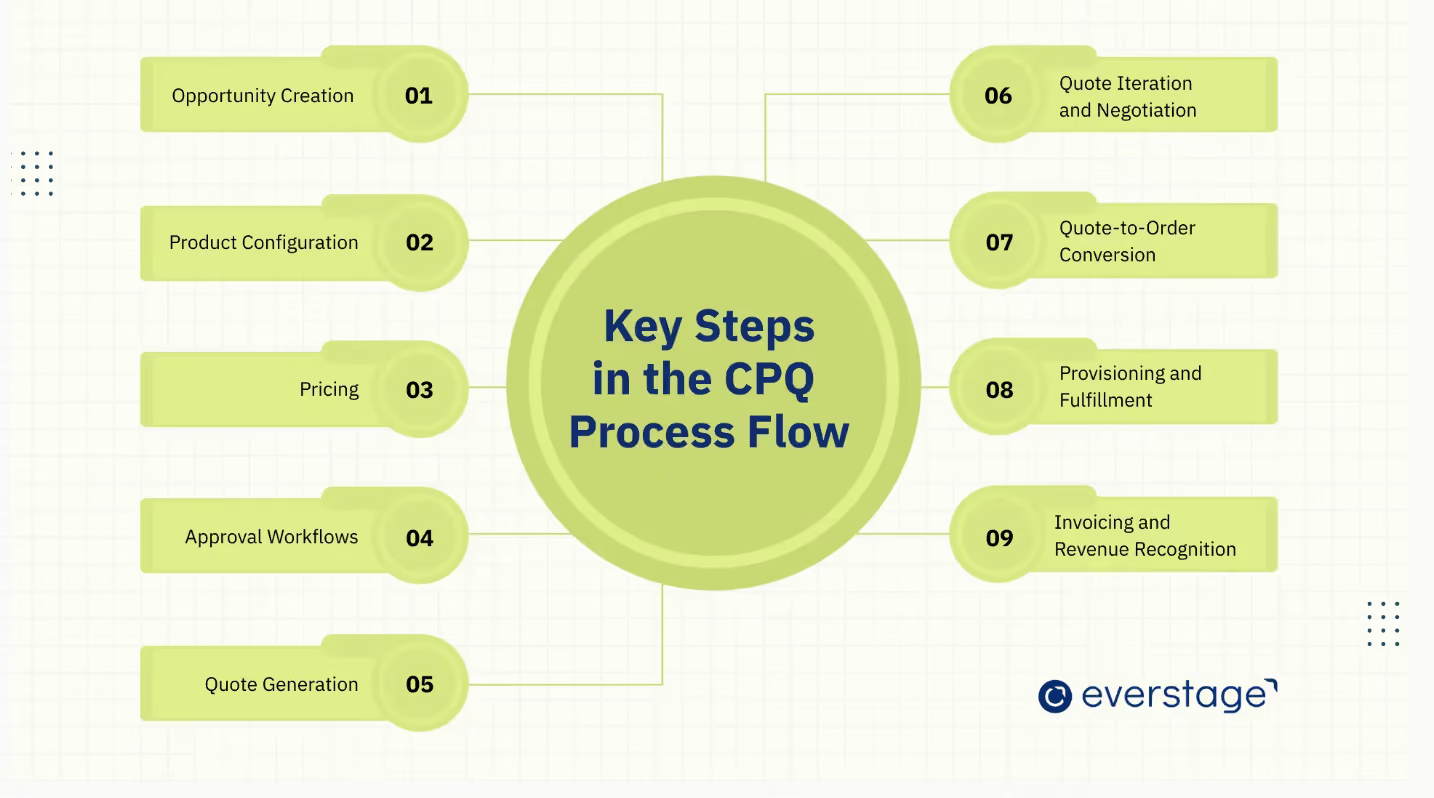
Quick Reference: CPQ Process Steps
- Opportunity Creation: Capture deal details in CRM
- Product Configuration: Select valid product/service combinations
- Pricing: Apply discounts, volume tiers, and customer-specific rates
- Approval Workflow: Route exceptions for stakeholder review
- Quote Generation: Produce professional, branded quotes
- Quote Iteration & Negotiation: Revise with tracked changes
- Quote-to-Order Conversion: Auto-convert accepted quotes to orders
- Provisioning & Fulfillment: Deliver products or activate services
- Invoicing & Revenue Recognition: Bill accurately and recognize revenue
The CPQ (Configure, Price, Quote) process flow is designed to streamline the entire sales cycle, ensuring that sales teams can work more efficiently and accurately. From the moment an opportunity is created to the final invoicing and revenue recognition, each step plays a critical role in optimizing the workflow.
Let's take a closer look at each stage:
Step 0: Opportunity Creation
The CPQ process starts when a sales opportunity is created in the CRM, capturing key details such as customer requirements, deal value, and expected timelines. This initial data sets the stage for the rest of the process by providing context for product selection, pricing, and approvals.
Accurate opportunity creation ensures that sales teams are working with the right information, reducing the risk of errors during the later stages. It provides a foundation for the CPQ process, ensuring that the configuration, pricing, and final quote align with the customer's specific needs and deal scope.
Step 1: Product Configuration
Once the opportunity is established, sales teams use CPQ to configure the products or services that best meet the customer's needs. The system automatically applies predefined rules to ensure that only valid, compatible combinations of products and services are selected, even for complex configurations.
Automated product configuration helps avoid mistakes in product bundling and feature compatibility. It ensures that the right products are selected based on customer requirements, reducing manual work and speeding up the sales cycle, while ensuring accuracy in the process.
Step 2: Pricing
After configuring the product, the CPQ system applies the appropriate pricing structures, such as discounts, volume-based pricing, or customer-specific rates, ensuring consistent pricing. This step ensures that the final price reflects both the configured products and any applicable discounts or promotions.
Pricing accuracy is vital for maintaining profitability and avoiding costly errors. By automating the pricing process, CPQ ensures that pricing remains consistent and adheres to company policies, reducing the risk of mispricing or manual calculation errors.
Advanced Pricing Capabilities: Modern CPQ systems go beyond static price lists. Real-time pricing pulls live market data and exchange rates so quotes stay accurate across regions. Multi-currency support automatically converts pricing for international deals, removing the burden of manual calculation. Dynamic discounting applies rule-based discounts that adjust based on deal size, customer tier, or contract length, keeping margins protected while giving reps the flexibility to close deals.
Step 3: Approval Workflow
For quotes that exceed predefined thresholds or require special conditions, the CPQ system routes them through an automated approval workflow. This ensures that any exceptions, discounts, or deviations from standard pricing are reviewed and approved by the necessary internal stakeholders.
Automated approval workflows help speed up the process while maintaining control over pricing and discounts. By reducing manual approval processes, sales teams can move deals forward faster, ensuring that quotes stay aligned with company policies and margins are protected.
Advanced CPQ Approval Scenarios: Enterprise deals rarely follow a single approval path. Multi-level approvals route quotes through sequential stakeholders. For example, a regional sales director approves discounts up to 15%, while anything above escalates to the VP of Sales and then Finance. Exception handling lets the system flag non-standard terms (custom payment schedules, extended warranties, or one-off bundles) and route them to the right specialist without stalling the entire deal. Compliance integration ensures that quotes touching regulated industries or specific geographies automatically include the required legal review step, keeping your organization audit-ready without adding manual checkpoints.
Step 4: Quote Generation
Once pricing and product configurations are approved, the CPQ system generates a professional price quote using pre-defined templates, ensuring consistency and accuracy. This quote includes all relevant details, such as pricing, terms, and any conditions, formatted consistently and in line with company standards.
Automated quote generation ensures consistency and accuracy, allowing sales teams to deliver quotes quickly. This speeds up the sales cycle by eliminating the need for manual quote creation, which can be time-consuming and error-prone.
For example, Everstage's CPQ solution automates this process with real-time updates, ensuring quotes are not only accurate but also delivered swiftly, reducing the time it takes for sales teams to respond to customers.
Step 5: Quote Iteration and Negotiation
During negotiations, sales reps may revise quotes based on customer feedback. The CPQ system allows for controlled updates to the configuration and pricing during this phase, ensuring that changes are tracked and consistent with business rules.
This step ensures flexibility during negotiations while maintaining control over pricing and product combinations. By automating the update process, the system prevents mistakes and ensures that the final quote reflects the most accurate and agreed-upon terms.
Step 6: Quote-to-Order Conversion
Once the customer accepts the quote, the CPQ system automatically converts it into an order, streamlining the quote-to-cash process and ensuring all details are transferred accurately. This eliminates the need for manual data entry, ensuring that all order details are accurate and up-to-date.
This step streamlines the transition from quote to order, reducing the risk of errors during the handoff. By automating this process, sales teams ensure that the order is executed without delays, and the customer's expectations are met promptly.
Step 7: Provisioning and Fulfillment
Once the order is confirmed, the product or service is provisioned or delivered, ensuring smooth customer interactions throughout the fulfillment process. This could involve shipping products, activating services, or fulfilling other customer commitments based on the order details.
Timely provisioning and fulfillment ensure that sales teams meet their commitments and deliver on promises made to customers. This step plays a crucial role in customer satisfaction, as delays or errors in delivery can lead to dissatisfaction and lost business.
Step 8: Invoicing and Revenue Recognition
The final step in the CPQ process involves generating invoices and recognizing revenue in the financial systems. The CPQ system ensures that billing is accurate and that the company adheres to revenue recognition standards for compliance.
Automating invoicing and revenue recognition reduces errors in financial reporting and ensures that revenue is recognized in compliance with accounting regulations. This step also facilitates smooth financial operations, ensuring the company is accurately compensated for its sales.
These streamlined steps ensure that the CPQ process is efficient, accurate, and aligned with business goals. By automating and optimizing each stage, sales teams can close deals faster, reduce errors, and enhance customer satisfaction.
CPQ in Action: Real-World Example of the CPQ Process
To see how the CPQ process flow works in practice, let's walk through a typical scenario for a mid-market B2B SaaS company selling a multi-product platform to an enterprise buyer.
Scenario: A sales rep at a SaaS company receives an inbound lead from a 500-person financial services firm seeking a bundled solution, including a core platform, an advanced analytics add-on, and premium support.
- Opportunity Creation: The rep logs the opportunity in Salesforce, capturing the prospect's requirements, estimated deal value ($120K ARR), and a 45-day close timeline.
- Product Configuration: Using CPQ, the rep selects the core platform (250 seats), the analytics add-on, and premium support. The system automatically validates that the analytics add-on requires the core platform and flags that premium support is only available for 100+ seat deals. Both conditions are met, so the configuration is approved.
- Pricing: The CPQ system applies volume-based pricing for 250 seats, a 10% multi-product bundle discount, and the customer's negotiated payment terms (annual billing, net-30). The total comes to $108K ARR after discounts.
- Approval Workflow: Because the bundle discount exceeds the rep's 8% authority, the quote routes to the regional sales director for approval. The director reviews the margin impact and approves within two hours.
- Quote Generation: The system generates a branded, professional quote PDF with itemized pricing, terms, and conditions, ready to send to the prospect.
- Quote Iteration: The prospect requests a 3-year contract with a 5% additional discount for the longer commitment. The rep updates the quote in CPQ, which recalculates pricing and re-routes for approval. The revised quote ($102.6K ARR) is approved and sent back within a day.
- Quote-to-Order Conversion: The prospect signs. CPQ automatically converts the accepted quote into an order, syncing all details to the ERP and billing systems.
- Provisioning: The platform activates 250 seats, enables the analytics module, and assigns a premium support manager, all triggered by the order confirmation.
- Invoicing & Revenue Recognition: The first annual invoice is generated automatically, and revenue is recognized in compliance with ASC 606 standards over the 3-year contract term.
Outcome: What could have taken weeks of back-and-forth emails, manual pricing calculations, and approval chains was completed in under a week with full audit trails, zero pricing errors, and a professional buyer experience from start to finish.
CPQ Process: With vs. Without Automation
Understanding the difference between manual quoting and an automated CPQ workflow makes the value proposition clear. Here's how they compare across the dimensions that matter most:
Manual vs Automated CPQ performance comparison
The bottom line: manual quoting might work when you have a handful of reps and simple pricing. But once your team scales past 50 reps, manages multi-product catalogs, or sells across regions, automation is a requirement.
Best Practices and Common Pitfalls in the CPQ Process
To maximize the effectiveness of your CPQ system and enhance its functionality, implementing best practices is essential.
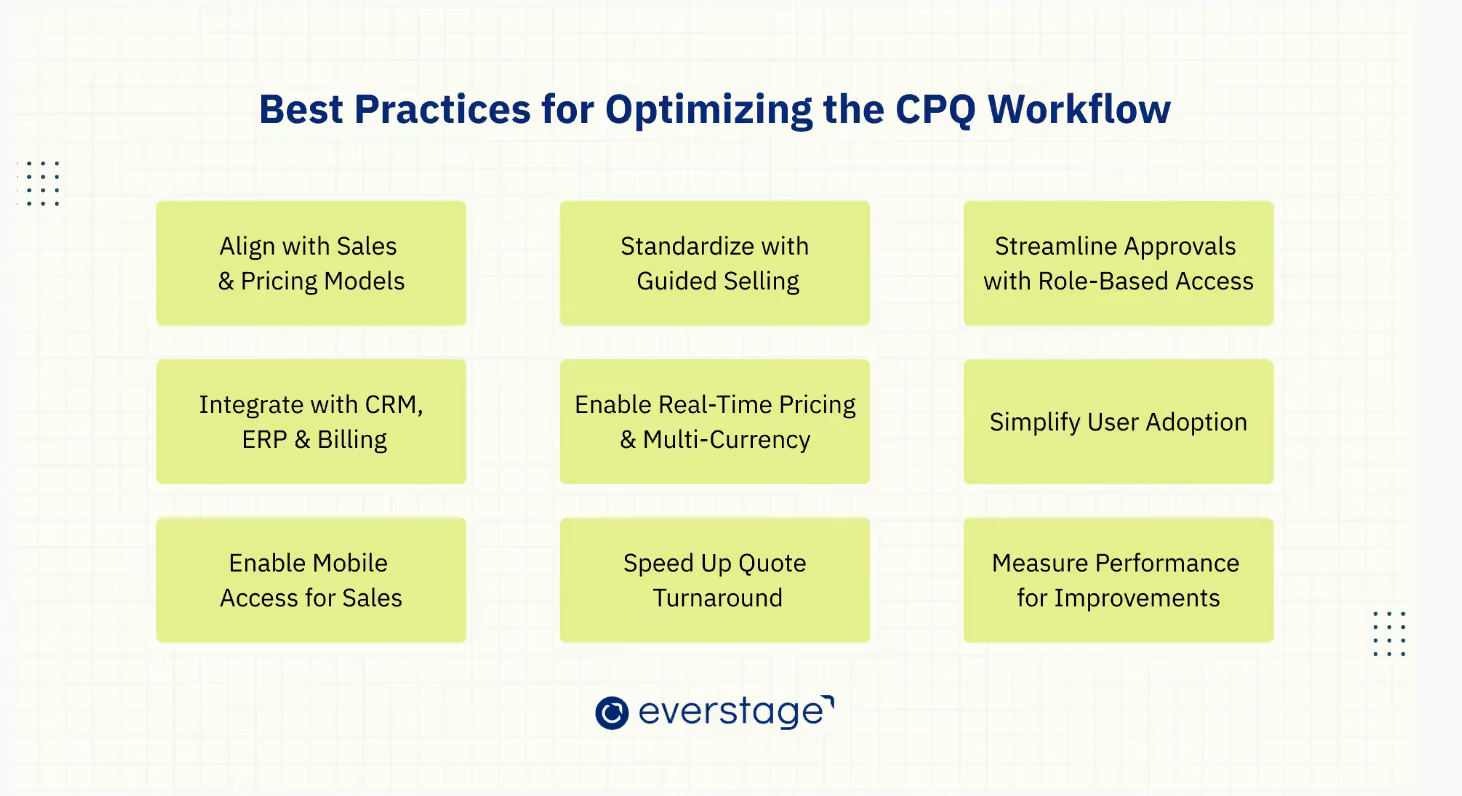
These practices help ensure efficiency, accuracy, and customer satisfaction at every step of the CPQ process.
1. Ensure CPQ Aligns with Your Sales and Pricing Models
Align your CPQ system with your sales strategies and pricing models to ensure consistent, accurate quotes. When the system matches the company's pricing policies and sales processes, it reduces errors and misalignments that can result in lost opportunities.
This alignment helps sales teams always use the correct data and pricing models, avoiding discrepancies that could lead to inaccurate quotes or revenue loss.
2. Standardize Product Configuration with Guided Selling
Guided selling simplifies product selection by offering suggestions based on customer needs, making it easier for sales representatives to identify upselling opportunities. This ensures that sales reps quickly select the correct configurations, avoiding mistakes and saving time in the quoting process.
By standardizing this process, guided selling reduces errors, speeds up the configuration phase, and ensures that product offerings are consistent with customer requirements.
3. Streamline Approval Workflows Using Role-Based Permissions
Automate quote approvals using role-based permissions to ensure that quotes are reviewed and approved by the appropriate stakeholders. This speeds up decision-making and ensures compliance with pricing and discount policies.
Role-based workflows reduce bottlenecks in the approval process, helping sales teams close deals more efficiently while maintaining control over pricing and margins.
4. Connect CPQ with CRM, ERP, and Billing Systems
For an end-to-end solution, your CPQ system should integrate seamlessly with CRM, ERP, and billing systems to streamline every aspect of the sales process.
Integrating CPQ with CRM, ERP, and billing systems ensures seamless data flow across sales, finance, and operations teams. This integration reduces manual data entry and errors, improving collaboration and accuracy.
By connecting systems, you eliminate data silos, save time, and ensure that all teams are working with the same, up-to-date information, improving decision-making and reducing the risk of discrepancies.
5. Support Real-Time Pricing and Multi-Currency Features
For businesses with international clients, real-time pricing and multi-currency support ensure that pricing reflects market conditions and exchange rates, making transactions seamless for global customers.
This is particularly important as Gartner reports 75% of B2B buyers prefer a sales experience without direct interaction with sales reps. By enabling self-service and automating the quoting process, CPQ systems help meet these buyer preferences, allowing customers to receive quotes instantly, without needing to engage with a sales rep.
Real-time updates also keep pricing accurate and responsive to changes in the market, ensuring customers are quoted correctly, regardless of their location or currency.
6. Improve User Adoption with an Easy-to-Use Interface
A user-friendly interface promotes high adoption rates, helping salespeople enhance customer relationships by generating accurate quotes quickly and efficiently. This reduces the time spent on training and increases system efficiency.
By making the system intuitive, you increase user engagement, reduce errors, and ensure faster and more accurate quote generation.
7. Enable Mobile Access for Sales Teams on the Go
Mobile access allows sales teams to generate quotes and access customer data from anywhere, improving flexibility and responsiveness. Sales reps can close deals faster by responding to customer inquiries in real time.
This increases sales team efficiency, allowing them to work from the field or on the go, leading to faster deal closures and improved customer engagement.
8. Reduce Quote Turnaround Time with Efficient Process Design
Streamline the quoting process to ensure faster response times. By removing unnecessary steps and automating repetitive tasks, you can reduce quote turnaround time, speeding up the sales cycle.
Faster quotes improve customer satisfaction and enable sales teams to respond promptly, ultimately helping to close deals more quickly.
9. Monitor and Measure Performance for Ongoing Improvements
Regularly track key performance metrics like quote accuracy, approval times, and quote-to-order conversion rates. This allows you to identify areas for improvement and continuously optimize the CPQ process.
Continuous monitoring and adjustments ensure that your CPQ system remains efficient, aligned with business goals, and responsive to any bottlenecks or inefficiencies that may arise.
Common Pitfalls to Avoid
While CPQ systems deliver significant efficiency and accuracy gains, several common pitfalls can undermine their effectiveness. Here's what to watch for:
1. Poor Integration: Failing to integrate CPQ with systems like CRM, ERP, and billing tools creates data silos, leading to inefficiencies and errors across teams.
Without seamless integration, sales teams may still rely on spreadsheets for quoting, leading to outdated or incomplete data, which can result in errors and inefficiencies. Proper integration ensures real-time, consistent data flow, improving alignment and reducing manual entry errors.
2. Overly Complex Product Configurations: Complicated product configurations can confuse sales reps and lead to mistakes when selecting options.
By simplifying configurations and using guided selling, you make the process more intuitive, allowing sales teams to easily choose valid products and bundles based on customer needs. This reduces errors, accelerates the quoting process, and ensures faster deal closures.
3. Inconsistent Pricing Rules: Without regular updates and consistent application, pricing rules can become outdated, leading to pricing errors and missed revenue opportunities.
Regularly reviewing and updating pricing models ensures that discounts, volume tiers, and customer-specific rates are always accurate, maintaining profitability while reducing errors in quotes.
4. Underestimating User Training: Neglecting sufficient user training can result in poor adoption and inefficient use of the CPQ system. If sales reps aren't fully trained, they may struggle with the system, resulting in lower productivity and inaccurate quotes.
Providing comprehensive training ensures that sales teams can leverage the CPQ tool effectively, maximizing its value and improving the overall sales process.
5. Ignoring Data Quality from Day One: CPQ is only as good as the data feeding it. If your CRM records are incomplete, product catalogs are outdated, or pricing tables haven't been audited, automation will amplify those problems rather than solve them. Establish a data governance process before go-live and schedule quarterly audits to keep your CPQ engine running clean.
6. Skipping Change Management: Rolling out CPQ without a structured change management plan leads to resistance and low adoption. Involve key stakeholders, such as sales reps, managers and finance, early in the process. Run pilot programs, collect feedback, and iterate before a full rollout. The technology is only half the equation; getting your team to actually use it is the other half.
Building a Faster, More Profitable Quote-to-Cash System
CPQ (Configure, Price, Quote) is a powerful tool for sales teams aiming to streamline the quoting process and boost efficiency.
By automating product configuration, pricing, and quote generation, CPQ systems eliminate manual errors and deliver key benefits, such as improved efficiency, faster deal closures, and enhanced customer satisfaction. This not only accelerates deal closures but also reduces sales cycle time, leading to increased revenue and improved customer satisfaction.
Optimizing your CPQ process means your sales team can focus on what matters most: building relationships and closing deals while automation handles the time-consuming tasks. With consistent pricing and reduced errors, businesses can improve both sales efficiency and profitability.
Unlike legacy CPQ tools that require months of implementation and heavy IT involvement, Everstage's CPQ solution is AI-first and built for modern sales teams. It integrates configuration, pricing, and quote generation into a single, seamless system with real-time CRM sync, AI-powered guided selling, and commission visibility baked directly into the quoting workflow, so reps can see how each deal impacts their earnings as they build the quote. With advanced analytics and no-code rule builders, RevOps and Finance teams stay in control without depending on engineering.
Ready to transform your sales process? Book a demo today and see how Everstage CPQ can streamline your workflow and drive greater business success. Get a tailored walkthrough for your industry.
Questions worth asking
The things most people want to know before they commit.
What is the CPQ process and why is it important?
The CPQ (Configure, Price, Quote) process is a structured workflow that automates how sales teams configure products, apply pricing rules, and generate quotes. It's important because it eliminates manual errors, enforces consistent pricing, and dramatically shortens the time from initial customer inquiry to delivered quote. For B2B companies with complex product catalogs, multi-tier pricing, or high deal volumes, CPQ is the backbone of an efficient sales operation.
What is a CPQ system, and how does it work?
CPQ improves the sales process by automating product configuration, pricing, and quote generation, which minimizes errors and delays. Sales reps can focus on closing deals rather than manual data entry or complex calculations. CPQ ensures consistency in pricing, speeds up quote creation, and ultimately shortens sales cycles, leading to faster deal closures and increased revenue.
How does the CPQ approval process work?
The CPQ approval process uses automated workflows to route quotes that exceed predefined thresholds, such as discount limits, non-standard payment terms, or custom configurations, to the appropriate stakeholders for review. Role-based permissions determine who can approve what, and multi-level approval chains handle escalations. This ensures pricing governance and margin protection without creating bottlenecks that slow down deal velocity.
What are the main challenges when implementing a CPQ process?
The most common challenges include poor data quality in source systems (CRM, product catalogs), insufficient integration with existing tools, overly complex product configurations that confuse reps, and underinvesting in user training and change management. Companies that address these proactively by auditing data before go-live, running pilot programs, and involving end users early, see significantly faster adoption and ROI.
Can CPQ support businesses with international clients?
Yes, CPQ systems can support businesses with international clients by offering multi-currency and real-time pricing features. These capabilities ensure that pricing reflects market conditions, currency exchange rates, and location-specific factors, making it easier to provide accurate and timely quotes for global customers.
How do I get started with Everstage's CPQ solution?
Getting started with Everstage's CPQ solution is straightforward. Book a demo to see how the system can streamline your sales workflow. Our team will walk you through the features, show how it integrates with your existing CRM, ERP, and billing systems, and help you implement a customized solution to optimize your quoting process. We also offer a free proof of concept where we'll build your most complex plan with real data before you commit.